Seedance 2.0 Fast Prompt - Capybara Executive’s Boardroom Presentation

- Model
- Seedance 2.0 Fast
- Aspect ratio
- 4:3
- Quality
- 480p
Prompt
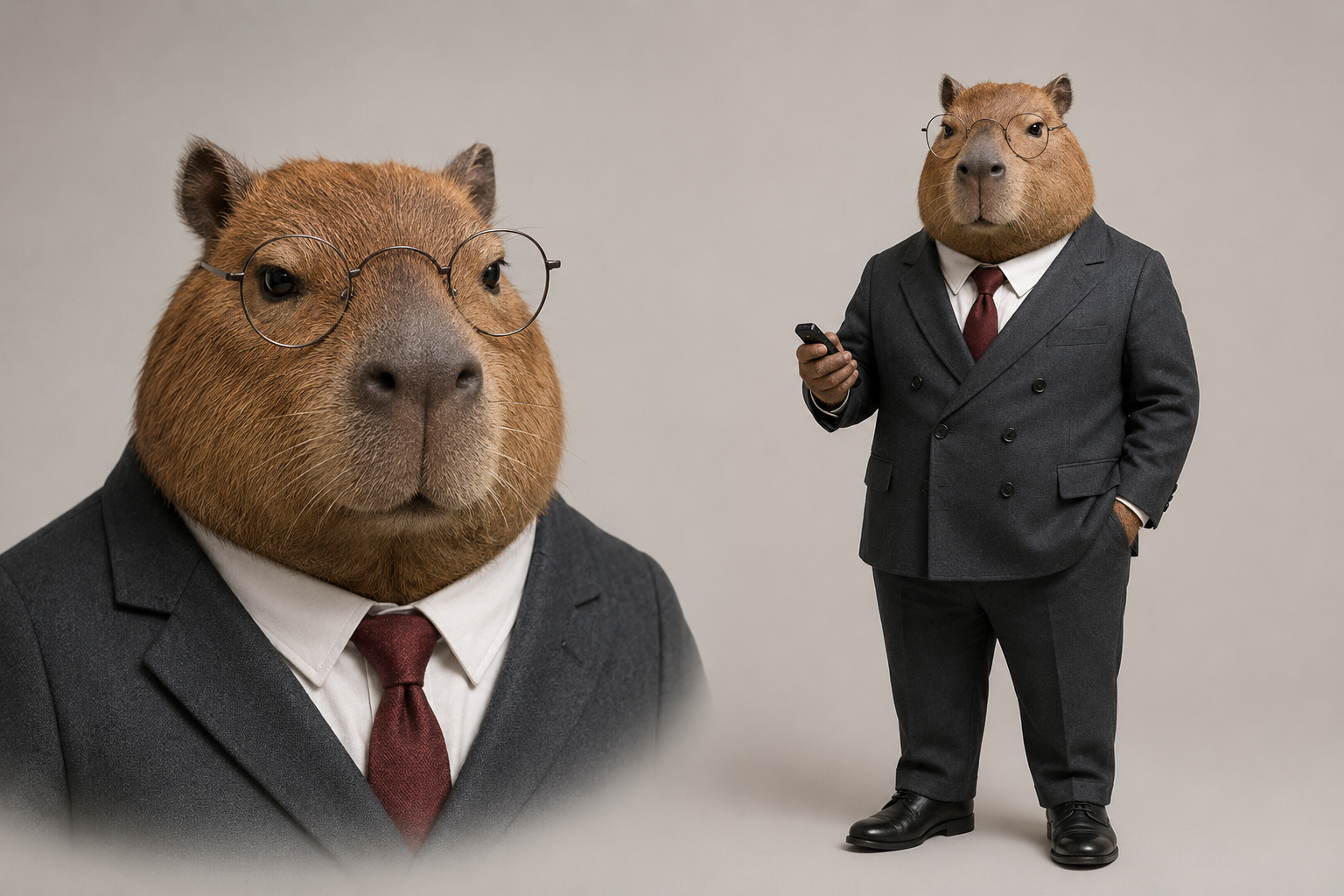
Use `<<<image_1>>>` as the exact character reference for the capybara executive. Preserve its broad round capybara face, short brown fur, dark-brown eyes, round metal-frame glasses, charcoal double-breasted suit, white shirt, dark-red tie, black leather shoes, and black presentation clicker. Do not alter the character's identity, fur color, facial structure, or clothing.
Begin with a stable medium shot in a realistic modern conference room. The camera slowly pushes toward the capybara executive's face, with no cuts. The capybara stands in front of a whiteboard facing softly blurred employee silhouettes around a conference table, maintaining a completely calm expression. It raises its right paw and clearly presses the black presentation clicker once. After a crisp click, a continuous burst of chart papers with no readable text suddenly shoots from the edge of the whiteboard, cascading across the table like a waterfall and swirling through the room. The employee silhouettes recoil in surprise. Without showing concern, the capybara slowly pushes its round glasses back into place with its left paw; its tie and ears move only slightly in the paper-filled airflow. As the camera continues pushing in, it looks directly into the lens with an emotionless, authoritative expression. One blank sheet drifts down and lands gently on its head, creating an absurd freeze-frame ending. Maintain realistic fur, suit fabric, and conference-room depth. Do not turn the character into a human or a flat cartoon sticker.
<crisp presentation-clicker sound> <rapid paper popping sounds> <large volume of paper fluttering> <brief chair scrape>, no music, no subtitles, no dialogue, no readable charts, no brand logos, no scene change, no character redesign, no extra characters in focus.
Reference image
Remixes
RemixNo remixes yet. Be the first to make your own version.
Use this video prompt
- 01
Start with the prompt
Copy the prompt, or open it with the generate button.
- 02
Make your changes
Adjust the subject, setting, or details. Add reference media if needed.
- 03
Check before generating
Review the model and output settings. Results can vary between generations.