

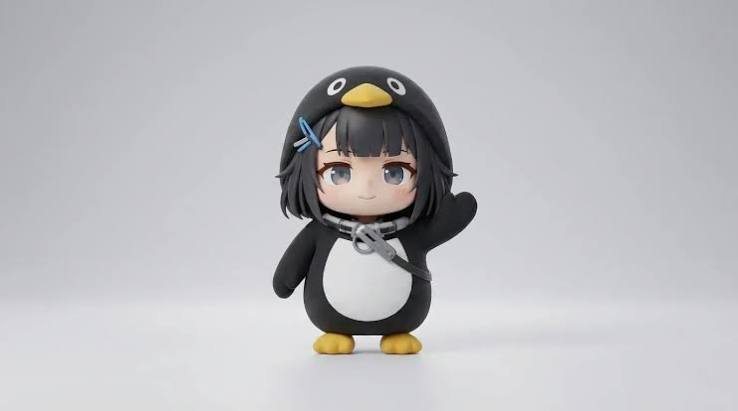
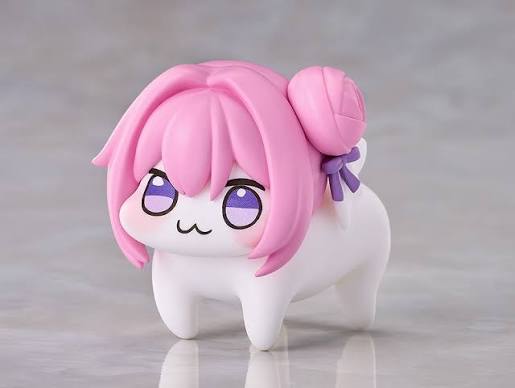
Use @image1 as the exact visual reference for Gugugaga and @image2 as the exact visual reference for Doro. Preserve both characters’ faces, colors, outfits, body proportions, and plush-toy textures. Gugugaga only says variations of “gugu,” “gaga,” and “gugugaga.” Doro never speaks, stays on four legs, and behaves completely like a puppy. First-person real-phone POV, slight natural handheld shake, autofocus, realistic everyday lighting, no subtitles, no watermark, no logos, no character swapping, no humanoid Doro, no extra limbs, and no character redesign. Create a 15-second outdoor life-comedy scene in a breezy neighborhood park. Gugugaga walks along the path holding a red balloon while Doro trots beside her. A gust makes the string slip free and Gugugaga cries {guga?!}. The balloon stays just above head height as its long string trails along the path. Doro sprints ahead on all four legs, makes one small safe jump, gently catches the string in its mouth, and trots back. Gugugaga takes the string, hugs it against the white belly, rubs Doro’s head, and says {gugugaga!}. End with both continuing down the path beneath the balloon. <light breeze> <distant birds>, no music, no balloon popping, no dangerous road, and no flying character.
AI Gugugaga Video Generator
Turn one Gugu Gaga Penguin image into a short, share-ready video. Upload a reference, choose a ready-made story prompt, and generate with compatible motion, audio, and aspect-ratio controls.
Add reference images (with key frames, max 9 images total). Each file under 30MB.
MP4/MOV, each 2-15s, max 3 clips, combined <=15s.
MP3/WAV/AAC/M4A/OGG, max 3 clips, combined <=15s.
Gugugaga prompt templates you can copy
Start with a focused, model-friendly prompt, then replace the setting, action, or ending. Keep the identity lock when you want the same penguin across multiple clips.
Tiny breakfast-table reaction
A simple one-character scene for testing identity, small gestures, camera motion, and a clean loop.
Suggested setup: Seedance 2 Fast · 9:16 · 5–10 seconds · Optional audio
Use the uploaded image as the exact character reference. Preserve the penguin silhouette, face, coat colors, beak, feet, and proportions in every frame. Place the small chibi penguin on a breakfast table beside an oversized cup. It waddles toward the cup, notices its reflection, tilts its head twice, then waves both flippers with a delighted baby-like reaction. Use one continuous medium shot with a gentle camera push-in. Keep the background simple, the action readable, and the character centered for a vertical short. End with the penguin returning to its opening pose for a clean loop. Add soft room ambience and light playful vocal babble only when the selected model supports generated audio. No subtitles, logos, extra limbs, or character redesign.
Calm-to-chaos office meme
A readable setup-and-reaction structure that keeps the penguin centered while the background becomes chaotic.
Suggested setup: Seedance 2 Fast · 9:16 or 1:1 · 5–10 seconds
Use the uploaded penguin reference as the exact identity guide. Preserve its face, outfit, colors, short body, and graphic chibi proportions. Begin with the penguin standing calmly at a tiny office desk. A single blank paper lands beside it, then a playful storm of blank papers fills the room. The penguin stays completely serious, slowly straightens its collar, and looks into the camera. Use a stable medium shot and one slow push-in. Keep all papers free of readable text. End on a still, loop-friendly reaction pose. No violence, no brand marks, no new main characters, no dialogue unless audio generation is enabled.
Looping convenience-store gag
A harmless physical-comedy prompt with one continuous camera move and a loop-friendly final pose.
Suggested setup: Seedance 2 Fast · 9:16 · 5–10 seconds · Audio optional
Animate the uploaded penguin reference in a bright convenience-store aisle. Keep the same face, coat, colors, beak, feet, and proportions throughout. The penguin waddles into frame, slips harmlessly on a loose paper bag, rolls once like a soft ball, then pops upright and poses proudly. Lightweight snack bags flutter in the air without anything breaking. Track backward smoothly at a low angle with no cuts. Make the action clear in the first second and return close to the opening composition for a loop. No injuries, no readable labels, no logos, no extra limbs, and no character redesign.
Best AI model and settings for Gugugaga videos
Start with a fast, affordable test, keep the scene focused, and increase quality only after the motion and character identity work. Available settings still depend on the selected model.
Seedance 2 Fast for the first pass
Use the configured fast model to test the action, framing, references, and audio before spending more credits on a final render.
Use 9:16 for short-form feeds
Choose portrait for TikTok, Reels, and Shorts. Use 4:3 or 16:9 only when the environment or a second character needs more room.
Keep each clip to one clear action
A focused 5–15 second scene is more reliable than a long prompt containing several locations, camera moves, and plot turns.
Treat generated audio as optional
When the model supports audio, request original baby-like vocal babble and simple scene sounds instead of relying on a specific protected audio clip.
How to make a Gugugaga video in 3 steps
Build one short scene in three steps, then generate another shot with the same reference if you want a longer story.
- 1
Upload a first frame or reference image
Choose a clean penguin image you own or may use. Use a first frame for an exact opening composition or references when identity matters most.
- 2
Describe one action and choose the output
Write the character details, movement, camera, sound, and ending, then select a compatible model, duration, aspect ratio, and resolution.
- 3
Check the estimate, generate, and review
Confirm the credit estimate on the Generate Video button. Finished results appear in My Works for preview and download.
How to keep Gugugaga on-model across clips
Character consistency comes from reusing the same references and repeating the visual traits that must not change. Generate one story beat at a time, then assemble the clips after the character looks stable.
Reuse the same reference images
Keep the clearest Gugugaga image in every generation. Add Doro as a second reference only when the scene needs both characters.
Lock the defining visual traits
Repeat the face, outfit, colors, beak, feet, body proportions, and plush texture that must remain unchanged.
Generate one beat per clip
Separate the setup, action, reaction, and ending instead of asking one generation to maintain a character through an entire story.
Keep the camera request simple
Use one shot and one camera move per clip so the model spends more attention on the character and main action.
What is the Gugugaga meme?
Gugugaga, also written Gugu Gaga Penguin, is a fan-made AI video meme built around a tiny penguin-like character, childlike everyday comedy, and the repeated baby-talk sound “gugu gaga.” The format became popular through short AI-generated clips shared on Chinese and international social platforms in 2026.
A community-made penguin character
The meme is commonly associated with a chibi penguin reinterpretation of the female Endministrator from Arknights: Endfield. It is fan-created rather than an official standalone game character.
Simple stories and baby-talk reactions
Typical clips place the character in a familiar situation, add one clear surprise or visual joke, and use “gugu gaga” as an expressive reaction rather than normal dialogue.
A flexible AI video format
Creators remix the idea with cooking, shopping, dancing, pranks, pets, and other short scenarios while keeping the rounded penguin silhouette and recognizable reaction style.
Use references responsibly
Promptsref is not affiliated with Arknights: Endfield, Hypergryph, or Gryphline. Use original or properly licensed images, audio, characters, and other source material.
Other AI Video Generators
AI Brainrot Generator
Turn an absurd idea, a first frame, or character reference images into a short, chaotic AI meme video. Start with an example, replace its image, and push the scene in your own direction.
AI Fruit Story Video Generator
Just enter a prompt or upload character images. AI turns them into viral-style fruit meme videos with motion, dialogue, and sound.
A2O LITE NEON Dance AI Video Generator
Two photos, one neon dance. Replace the black-haired dancer on the left and the light-brown-haired dancer on the right while the choreography, timing and camera stay the same.
Dame Hombro AI Video Generator
One photo, the whole Dame Hombro moment. Upload a clear picture and AI swaps that person into the red-lit party clip, keeping the moves, crowd, camera and original audio.
Dime Dime Baby AI Video Generator
One photo, one viral wedding dance. Your character takes over the Dime Dime Baby moves while the guests, camera and party lighting stay the same.
Gangnam Style AI Video Generator
Three photos, one Gangnam night out. Upload a picture for each spot and AI swaps all three people into the neon-lit Seoul street clip, keeping the walk, the camera and the original audio.
Hotel Lobby AI Rap Duo Video Generator
Upload 2 photos—friends, pets, or characters—and this free Hotel Lobby AI Rap Duo Video Generator drops them into the iconic orange booth to trade bars like Quavo & Takeoff.
KONG KONG KING KING KING AI Video Generator
Two photos. One keyboard. Your duo. Replace the left keyboard player and the right hype partner in the white-studio performance with your chosen pair.
Rosé & Bruno Mars APT. AI Video Generator
Add two photos to the Rosé & Bruno Mars APT. AI video generator — Photo 1 grabs the mic, Photo 2 takes the drums — and get a 15-second pink-studio duo video.
Sawadika Dance AI Video Generator
One photo, one viral dance. Replace the rooftop dancer with your person while the Sawadika moves, low-angle camera and blue-sky background stay the same.
STORM II AI video generator
Our STORM II AI video generator puts your characters in the scene: one image for the front, one for the steps. Our self-made depth reference carries only the dance, so every face and outfit comes from your images.
AI Gugugaga Video Generator FAQs
It is an image-to-video and text-guided workflow for making short Gugu Gaga-style penguin scenes. You provide a prompt and may add a first frame or reference image; the selected model generates the movement and, when supported, audio.
No, but a clear reference is useful when you want a recognizable recurring penguin. A first frame controls the opening composition; reference images focus more on identity and visual details.
Describe one character, one location, one main action, one camera move, and a simple ending. Repeat the visual traits that must not change and keep multi-shot story ideas for separate generations.
Audio support depends on the selected model. When an audio option is available, enable it and describe the desired original vocal style and scene sounds. The page does not bundle or guarantee a specific copyrighted audio clip.
Available duration and resolution combinations vary by model. The current generator controls show the compatible choices, and the button displays the credit estimate before generation.
Cost changes with the selected model, duration, resolution, and audio settings. Check the live estimate on the Generate Video button before starting.
You can export a vertical clip for short-form platforms, but you remain responsible for the rights to uploaded references, audio, logos, characters, and other material in the result.
No. Promptsref is not affiliated with, endorsed by, or sponsored by Arknights: Endfield, Hypergryph, or Gryphline. This is a general AI creation tool; use original or properly licensed material and avoid implying official endorsement.
Turn one penguin reference into a short scene
Upload an image, choose a motion recipe, and adapt the character, action, camera, and sound to your idea.
Create an AI Gugugaga Video