

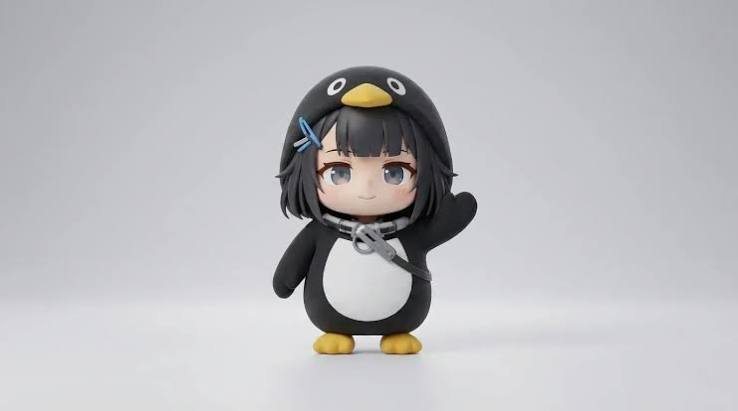
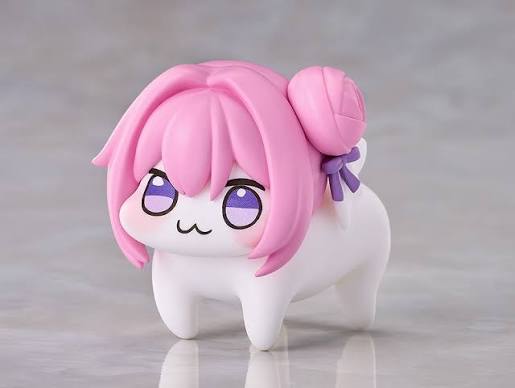
Use @image1 as the exact visual reference for Gugugaga and @image2 as the exact visual reference for Doro. Preserve both characters’ faces, colors, outfits, body proportions, and plush-toy textures. Gugugaga only says variations of “gugu,” “gaga,” and “gugugaga.” Doro never speaks, stays on four legs, and behaves completely like a puppy. First-person real-phone POV, slight natural handheld shake, autofocus, realistic everyday lighting, no subtitles, no watermark, no logos, no character swapping, no humanoid Doro, no extra limbs, and no character redesign. Create a 15-second outdoor life-comedy scene in a breezy neighborhood park. Gugugaga walks along the path holding a red balloon while Doro trots beside her. A gust makes the string slip free and Gugugaga cries {guga?!}. The balloon stays just above head height as its long string trails along the path. Doro sprints ahead on all four legs, makes one small safe jump, gently catches the string in its mouth, and trots back. Gugugaga takes the string, hugs it against the white belly, rubs Doro’s head, and says {gugugaga!}. End with both continuing down the path beneath the balloon. <light breeze> <distant birds>, no music, no balloon popping, no dangerous road, and no flying character.
AIググガガ動画生成
ググガガ・ペンギンの画像一枚を、すぐ共有できる短い動画に。参考画像と既成の物語プロンプトを選び、対応する動き、音声、画面比率で生成できます。
参考画像(キーフレームを含む)を合計最大9枚まで追加できます。各ファイルは30MB未満。
MP4/MOV, each 2-15s, max 3 clips, combined <=15s.
MP3/WAV/AAC/M4A/OGG, max 3 clips, combined <=15s.
コピーして使えるググガガ動画プロンプト
モデルが理解しやすい一場面のプロンプトから始め、場所、動き、結末を変更します。同じキャラクターを続ける場合は外見固定の記述を残してください。
朝食テーブルの小さな反応
同一性、小さな仕草、簡単なカメラ移動、ループを試す一人用シーンです。
推奨設定: Seedance 2 Fast · 9:16 · 5〜10秒 · 音声は任意
Use the uploaded image as the exact character reference. Preserve the penguin silhouette, face, coat colors, beak, feet, and proportions in every frame. Place the small chibi penguin on a breakfast table beside an oversized cup. It waddles toward the cup, notices its reflection, tilts its head twice, then waves both flippers with a delighted baby-like reaction. Use one continuous medium shot with a gentle camera push-in. Keep the background simple, the action readable, and the character centered for a vertical short. End with the penguin returning to its opening pose for a clean loop. Add soft room ambience and light playful vocal babble only when the selected model supports generated audio. No subtitles, logos, extra limbs, or character redesign.
静かなオフィスから大混乱へ
ペンギンを中央に保ち、背景だけを混乱させる分かりやすい導入と反応です。
推奨設定: Seedance 2 Fast · 9:16 または 1:1 · 5〜10秒
Use the uploaded penguin reference as the exact identity guide. Preserve its face, outfit, colors, short body, and graphic chibi proportions. Begin with the penguin standing calmly at a tiny office desk. A single blank paper lands beside it, then a playful storm of blank papers fills the room. The penguin stays completely serious, slowly straightens its collar, and looks into the camera. Use a stable medium shot and one slow push-in. Keep all papers free of readable text. End on a still, loop-friendly reaction pose. No violence, no brand marks, no new main characters, no dialogue unless audio generation is enabled.
コンビニのループギャグ
一回の連続カメラ移動と、ループしやすい最後のポーズを使う安全なコメディーです。
推奨設定: Seedance 2 Fast · 9:16 · 5〜10秒 · 音声は任意
Animate the uploaded penguin reference in a bright convenience-store aisle. Keep the same face, coat, colors, beak, feet, and proportions throughout. The penguin waddles into frame, slips harmlessly on a loose paper bag, rolls once like a soft ball, then pops upright and poses proudly. Lightweight snack bags flutter in the air without anything breaking. Track backward smoothly at a low angle with no cuts. Make the action clear in the first second and return close to the opening composition for a loop. No injuries, no readable labels, no logos, no extra limbs, and no character redesign.
ググガガ動画におすすめのモデルと設定
まず高速で低コストな設定で動きとキャラクターを確認し、安定してから画質を上げます。利用可能な項目はモデルによって異なります。
最初は Seedance 2 Fast
動き、構図、参考画像、音声を確認してから最終版にポイントを使います。
短尺投稿には 9:16
TikTok、Reels、Shorts は縦型。背景や二人目が必要な場合だけ 4:3 や 16:9 を選びます。
一つのクリップに一つの動き
5〜15秒の集中した場面は、複数の場所やカメラ移動を含む長い指示より安定します。
生成音声は任意
対応モデルでは、既存の保護音源ではなく、オリジナルの赤ちゃん風の声と簡単な環境音を指定します。
ググガガ動画の作り方
三つの手順で一場面を作れます。長い話は同じ参考画像で場面ごとに生成します。
- 1
参考画像を入れる
開始画面を固定するなら最初のフレーム、外見を保つなら参考画像を使います。
- 2
動きと出力を決める
動き、カメラ、音、結末を書き、モデル、長さ、比率、画質を選びます。
- 3
ポイントを確認して生成
ボタンの見積もりを確認し、完成後は「マイ作品」で再生・保存します。
複数クリップでググガガの姿を保つ方法
同じ参考画像を再利用し、変えてはいけない外見を毎回記述します。一つの出来事ずつ生成し、安定した後でクリップをつなぎます。
同じ参考画像を使う
最も鮮明なググガガ画像を毎回使い、Doro が必要な場面だけ二枚目を追加します。
特徴を固定する
顔、服、色、くちばし、足、体格、ぬいぐるみの質感を繰り返します。
一つの場面に一つの出来事
導入、動き、反応、結末を分け、一本で物語全体を作らせません。
カメラ指定を簡単にする
一場面につき一つの画角と一つのカメラ移動に絞ります。
ググガガとは?
ググガガ・ペンギンは、丸いペンギン風キャラクター、日常の小さな騒動、赤ちゃん言葉の「ググガガ」を組み合わせたファン制作のAI動画ミームです。2026年に短尺動画サイトを中心に広まりました。
ファンが作ったペンギン姿
『アークナイツ:エンドフィールド』の女性管理人をペンギン風に描いた二次創作として知られ、公式の独立キャラクターではありません。
短い日常コメディー
分かりやすい場面に一つの意外な出来事を加え、「ググガガ」で感情を表します。
自由に変えられる形式
料理、買い物、ダンス、いたずら、ペットとの交流などに応用できます。
権利を確認
Promptsrefは関係各社と提携していません。使用許可のある画像、音声、キャラクターをお使いください。
ほかのAI動画生成ツール
AIブレインロット動画生成ツール
突拍子もないアイデア、最初のフレーム、キャラクターの参照画像を、短くカオスなAIミーム動画に変換します。作例を読み込み、画像や場面を自分のアイデアに合わせて変更できます。
AIフルーツストーリー動画生成ツール
プロンプトを入力するかキャラクター画像をアップロードするだけで、動き・セリフ・音声のあるフルーツミーム動画をAIが生成します。
「Hotel Lobby」風デュオ動画AIジェネレーター
友だち、ペット、キャラクターの写真を2枚アップロードするだけ。この無料のHotel Lobby AIラップデュオ動画ジェネレーターが、あのオレンジ色のスタジオでQuavoとTakeoffのようにラップを掛け合う動画に仕上げます。
A2O LITE NEON Dance AI 動画ジェネレーター
写真2枚でネオンダンス。左の黒髪ロングのダンサーと右のライトブラウンのダンサーを入れ替え、振付とカメラワークはそのまま残します。
Dame Hombro AI 動画ジェネレーター
写真1枚で Dame Hombro の主役に。鮮明な写真をアップロードすると、AI が赤いライトのパーティー動画にその人を入れ替え、動き・観客・カメラ・元の音声を保ちます。
Dime Dime Baby AI動画ジェネレーター
写真1枚でバズる結婚式ダンス。Dime Dime Babyの振付をあなたのキャラクターに、ゲスト・カメラ・照明はそのまま。
Gangnam Style AI 動画ジェネレーター
写真3枚で、江南の夜へ。各ポジションに1枚ずつアップロードすると、AI がネオンのソウルの街の3人を入れ替えます。歩き方、カメラワーク、元の音声はそのままです。
KONG KONG KING KING KING AIデュオ動画生成
写真2枚と1台のキーボードで、あなたのデュオを。白いスタジオの左の演奏者と右の盛り上げ役を、選んだ2人に入れ替えます。
Sawadika Dance AI 動画ジェネレーター
写真1枚でバズダンス。屋上のダンサーを入れ替え、Sawadikaの振付、ローアングルのカメラ、青空の背景はそのまま。
STORM II AI動画ジェネレーター
STORM II AI動画ジェネレーターで、あなたのキャラを主役に。1枚をセンターに、もう1枚を階段いっぱいに。独自の深度参考動画はダンスの動きだけを伝えるので、顔も衣装もすべてあなたの画像から作られます。
ロゼ&ブルーノ・マーズ「APT.」AI動画ジェネレーター
ロゼ&ブルーノ・マーズ「APT.」AI動画ジェネレーターに写真を2枚入れるだけ。写真1がマイク、写真2がドラムを担当し、15秒のピンクスタジオ動画になります。
よくある質問
画像と文章から、ググガガ風の短いペンギン動画を作る機能です。
必須ではありませんが、同じ姿を保ちたい場合に役立ちます。
一人、一つの場所、一つの動き、一つのカメラ移動、短い結末に絞ります。
音声対応モデルなら生成できます。特定の既存音源は付属しません。
選ぶモデルで異なり、対応する設定だけが画面に表示されます。
モデル、長さ、画質、音声で変わります。生成ボタンの見積もりをご確認ください。
できますが、画像、音声、キャラクターなどの利用権は投稿者が確認してください。
いいえ。Promptsrefは『アークナイツ:エンドフィールド』、Hypergryph、Gryphlineと提携していません。