

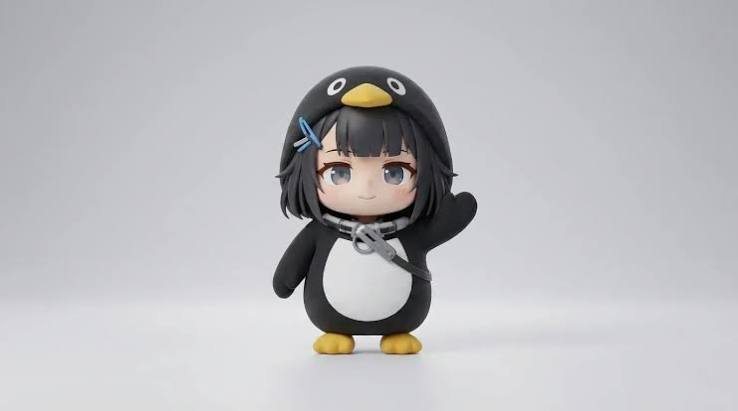
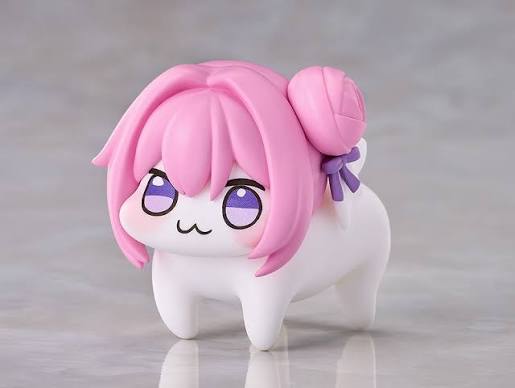
Use @image1 as the exact visual reference for Gugugaga and @image2 as the exact visual reference for Doro. Preserve both characters’ faces, colors, outfits, body proportions, and plush-toy textures. Gugugaga only says variations of “gugu,” “gaga,” and “gugugaga.” Doro never speaks, stays on four legs, and behaves completely like a puppy. First-person real-phone POV, slight natural handheld shake, autofocus, realistic everyday lighting, no subtitles, no watermark, no logos, no character swapping, no humanoid Doro, no extra limbs, and no character redesign. Create a 15-second outdoor life-comedy scene in a breezy neighborhood park. Gugugaga walks along the path holding a red balloon while Doro trots beside her. A gust makes the string slip free and Gugugaga cries {guga?!}. The balloon stays just above head height as its long string trails along the path. Doro sprints ahead on all four legs, makes one small safe jump, gently catches the string in its mouth, and trots back. Gugugaga takes the string, hugs it against the white belly, rubs Doro’s head, and says {gugugaga!}. End with both continuing down the path beneath the balloon. <light breeze> <distant birds>, no music, no balloon popping, no dangerous road, and no flying character.
AI 구구가가 영상 생성기
구구가가 펭귄 이미지 한 장을 바로 공유할 수 있는 짧은 영상으로 만드세요. 참고 이미지와 준비된 이야기 프롬프트를 고르고 지원되는 모션, 오디오, 화면 비율로 생성할 수 있습니다.
키프레임을 포함해 참고 이미지를 최대 9장까지 추가할 수 있습니다. 각 파일은 30MB 미만입니다.
MP4/MOV, each 2-15s, max 3 clips, combined <=15s.
MP3/WAV/AAC/M4A/OGG, max 3 clips, combined <=15s.
복사해서 쓰는 구구가가 영상 프롬프트
모델이 이해하기 쉬운 한 장면 프롬프트로 시작한 뒤 장소, 동작, 결말을 바꾸세요. 같은 캐릭터를 이어갈 때는 외형 고정 문장을 유지하세요.
아침 식탁의 작은 반응
캐릭터 일관성, 작은 몸짓, 단순한 카메라 이동과 루프를 시험하는 한 캐릭터 장면입니다.
추천 설정: Seedance 2 Fast · 9:16 · 5–10초 · 오디오 선택
Use the uploaded image as the exact character reference. Preserve the penguin silhouette, face, coat colors, beak, feet, and proportions in every frame. Place the small chibi penguin on a breakfast table beside an oversized cup. It waddles toward the cup, notices its reflection, tilts its head twice, then waves both flippers with a delighted baby-like reaction. Use one continuous medium shot with a gentle camera push-in. Keep the background simple, the action readable, and the character centered for a vertical short. End with the penguin returning to its opening pose for a clean loop. Add soft room ambience and light playful vocal babble only when the selected model supports generated audio. No subtitles, logos, extra limbs, or character redesign.
조용한 사무실에서 혼란으로
펭귄은 중앙에 유지하고 배경만 혼란스러워지는 명확한 설정과 반응 구조입니다.
추천 설정: Seedance 2 Fast · 9:16 또는 1:1 · 5–10초
Use the uploaded penguin reference as the exact identity guide. Preserve its face, outfit, colors, short body, and graphic chibi proportions. Begin with the penguin standing calmly at a tiny office desk. A single blank paper lands beside it, then a playful storm of blank papers fills the room. The penguin stays completely serious, slowly straightens its collar, and looks into the camera. Use a stable medium shot and one slow push-in. Keep all papers free of readable text. End on a still, loop-friendly reaction pose. No violence, no brand marks, no new main characters, no dialogue unless audio generation is enabled.
편의점 루프 개그
한 번의 연속 카메라 이동과 루프하기 쉬운 마지막 자세를 쓰는 안전한 코미디 장면입니다.
추천 설정: Seedance 2 Fast · 9:16 · 5–10초 · 오디오 선택
Animate the uploaded penguin reference in a bright convenience-store aisle. Keep the same face, coat, colors, beak, feet, and proportions throughout. The penguin waddles into frame, slips harmlessly on a loose paper bag, rolls once like a soft ball, then pops upright and poses proudly. Lightweight snack bags flutter in the air without anything breaking. Track backward smoothly at a low angle with no cuts. Make the action clear in the first second and return close to the opening composition for a loop. No injuries, no readable labels, no logos, no extra limbs, and no character redesign.
구구가가 영상 추천 모델과 설정
먼저 빠르고 저렴한 설정으로 동작과 캐릭터를 확인하고, 안정된 뒤 품질을 높이세요. 실제 선택 항목은 모델에 따라 달라집니다.
첫 테스트는 Seedance 2 Fast
동작, 구도, 참고 이미지와 오디오를 확인한 뒤 최종 렌더링에 더 많은 크레딧을 사용하세요.
숏폼에는 9:16
TikTok, Reels, Shorts에는 세로 비율을 쓰고, 배경이나 두 번째 캐릭터가 필요할 때만 4:3 또는 16:9를 선택하세요.
클립마다 한 가지 동작
5–15초의 집중된 장면이 여러 장소와 카메라 동작을 담은 긴 프롬프트보다 안정적입니다.
생성 오디오는 선택 사항
지원 모델에서는 특정 보호 음원 대신 독창적인 아기 같은 옹알이와 간단한 장면 소리를 요청하세요.
구구가가 영상 만드는 법
세 단계로 짧은 장면을 만드세요. 긴 이야기는 같은 참고 이미지로 장면별 생성이 좋습니다.
- 1
참고 이미지 올리기
첫 구도를 고정하려면 첫 프레임, 외형 유지가 중요하면 참고 이미지를 사용합니다.
- 2
동작과 출력 선택
동작, 카메라, 소리, 결말을 적고 모델, 길이, 비율, 화질을 고릅니다.
- 3
포인트 확인 후 생성
버튼의 예상 포인트를 확인하고 완성 후 내 작품에서 재생하거나 저장합니다.
여러 클립에서 구구가가 모습을 유지하는 방법
같은 참고 이미지를 재사용하고 바뀌면 안 되는 외형을 매번 반복하세요. 한 번에 한 장면만 생성하고 캐릭터가 안정된 뒤 클립을 이어 붙이세요.
같은 참고 이미지 재사용
가장 선명한 구구가가 이미지를 매번 넣고, Doro가 필요한 장면에만 두 번째 이미지를 추가하세요.
핵심 외형 고정
얼굴, 의상, 색상, 부리, 발, 신체 비율과 봉제 질감을 반복하세요.
클립마다 한 장면
설정, 동작, 반응, 결말을 나누고 한 번의 생성에 전체 이야기를 맡기지 마세요.
카메라 요청 단순화
클립마다 한 가지 숏과 한 번의 카메라 이동만 사용하세요.
구구가가 밈이란?
구구가가 펭귄은 둥근 펭귄형 캐릭터, 일상 속 작은 소동, 아기 옹알이 같은 “구구가가” 소리를 결합한 팬 제작 AI 영상 밈입니다. 2026년 숏폼 플랫폼을 중심으로 퍼졌습니다.
팬이 만든 펭귄 모습
《명일방주: 엔드필드》 여성 관리자를 펭귄처럼 재해석한 2차 창작으로 알려져 있으며 공식 독립 캐릭터는 아닙니다.
짧은 생활 코미디
익숙한 상황에 한 번의 반전이나 실수를 넣고 “구구가가”로 감정을 표현합니다.
자유롭게 바꾸는 형식
요리, 쇼핑, 춤, 장난, 반려동물 이야기 등으로 응용할 수 있습니다.
사용 권리 확인
Promptsref는 관련 회사와 제휴하지 않습니다. 사용 권한이 있는 이미지, 음성, 캐릭터만 이용하세요.
다른 AI 동영상 생성기
AI 브레인로트 영상 생성기
황당한 아이디어, 첫 프레임, 캐릭터 참조 이미지를 짧고 혼란스러운 AI 밈 영상으로 바꿉니다. 예시를 불러온 뒤 이미지와 장면을 원하는 대로 수정하세요.
AI 과일 스토리 영상 생성기
프롬프트를 입력하거나 캐릭터 이미지를 업로드하면 AI가 움직임, 대사, 사운드가 있는 과일 밈 영상을 만듭니다.
‘Hotel Lobby’ 스타일 듀오 AI 영상 생성기
친구, 반려동물, 캐릭터의 사진 두 장을 올려 보세요. 무료 Hotel Lobby AI 랩 듀오 영상 생성기가 특유의 주황색 스튜디오에서 Quavo와 Takeoff처럼 랩을 주고받는 영상으로 만들어 줍니다.
로제 브루노 마스 APT. AI 영상 생성기
로제 브루노 마스 APT. AI 영상 생성기에 사진 2장만 넣으세요. 사진 1은 마이크, 사진 2는 드럼을 맡아 15초 핑크 스튜디오 영상이 나와요.
A2O LITE NEON Dance AI 영상 생성기
사진 두 장, 네온 댄스 한 곡. 왼쪽 검은 긴 머리 댄서와 오른쪽 밝은 갈색 머리 댄서를 원하는 사람으로 바꾸고 안무와 카메라는 그대로 둡니다.
Dame Hombro AI 영상 생성기
사진 한 장으로 Dame Hombro 주인공이 되세요. 선명한 사진을 올리면 AI가 붉은 조명의 파티 영상 속 인물을 바꾸고 동작, 관중, 카메라, 원본 오디오를 유지합니다.
Dime Dime Baby AI 영상 생성기
사진 한 장, 바이럴 결혼식 댄스. 내 캐릭터가 Dime Dime Baby 동작을 이어받고 하객, 카메라, 조명은 그대로.
Gangnam Style AI 영상 생성기
사진 세 장으로 강남의 밤을. 자리마다 사진을 한 장씩 올리면 AI가 네온 가득한 서울 거리 영상 속 세 사람을 모두 바꿔 줍니다. 걸음, 카메라 워크, 원본 오디오는 그대로입니다.
KONG KONG KING KING KING AI 듀오 영상 생성기
사진 두 장, 키보드 한 대, 나만의 듀오. 흰 스튜디오의 왼쪽 연주자와 오른쪽 분위기 담당을 원하는 두 사람으로 바꿔 보세요.
Sawadika Dance AI 영상 생성기
사진 한 장, 바이럴 댄스 한 곡. 옥상 댄서를 바꾸고 Sawadika 동작, 로우앵글 카메라, 파란 하늘 배경은 그대로.
STORM II AI 영상 생성기
STORM II AI 영상 생성기로 내 캐릭터를 주인공으로. 한 장은 센터에, 한 장은 계단 가득. 자체 제작 깊이 참고 영상은 춤 동작만 전달해서 얼굴과 의상은 모두 내 이미지에서 나와요.
자주 묻는 질문
이미지와 글로 구구가가풍 펭귄 숏폼을 만드는 기능입니다.
필수는 아니지만 같은 외형을 유지하는 데 도움이 됩니다.
캐릭터 하나, 장소 하나, 핵심 동작 하나, 카메라 이동 하나, 짧은 결말로 적으세요.
음성을 지원하는 모델에서 가능합니다. 특정 기존 음원은 제공하지 않습니다.
모델마다 다르며 화면에 가능한 설정만 표시됩니다.
모델, 길이, 화질, 음성에 따라 달라집니다. 생성 버튼의 견적을 확인하세요.
가능하지만 이미지, 음성, 캐릭터 등의 사용 권리는 직접 확인해야 합니다.
아닙니다. Promptsref는 《명일방주: 엔드필드》, Hypergryph, Gryphline과 제휴하지 않습니다.