GPT Image 2.0 Prompt - Subha Bakhair Card with Quba Mosque

- Model
- GPT Image 2.0
- Aspect ratio
- 3:4
- Quality
- 1K
Prompt
Subject and Composition
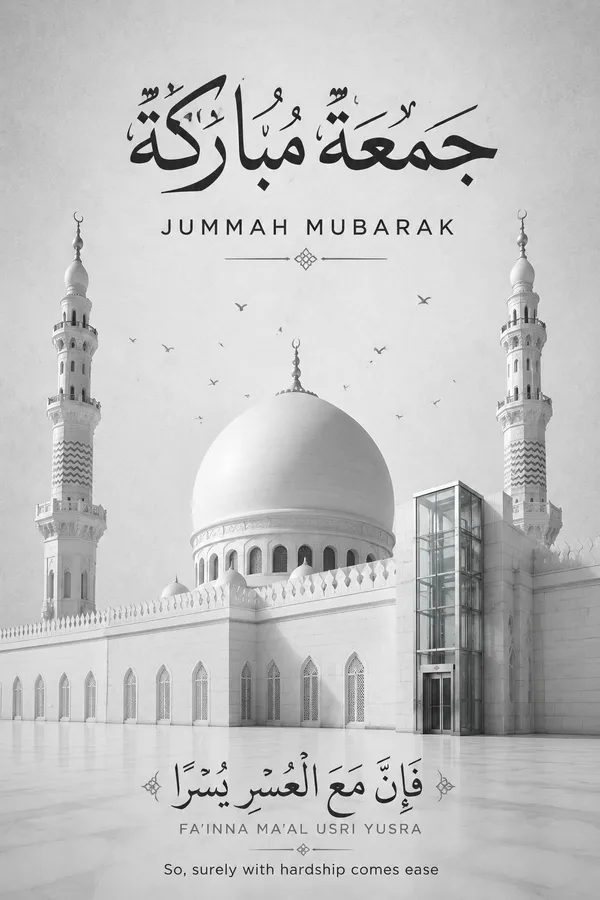
A minimalist and elegant Subha Bakhair greeting card design centered on a serene architectural composition. The scene features the iconic white dome and two minarets of Al-Masjid al-Quba rendered in a clean, sophisticated aesthetic. A subtle, modern elevator glass lift is integrated into the side of the mosque structure, featuring sleek brushed steel and transparent glass panels that reflect the surrounding courtyard light. Tiny, graceful silhouettes of birds are scattered near the dome, adding a sense of movement and scale.
Typography and Calligraphy
At the top, prominent bold black Arabic calligraphy reads Jummah Mubarak, with the English translation placed directly underneath in a crisp, modern sans-serif font. At the bottom, exquisite Arabic calligraphy displays the Quranic verse لَا يُكَلِّفُ اللَّهُ نَفْسًا إِلَّا وُسْعَهَا, followed by its English transliteration and the text Allah does not burden a soul beyond that it can bear, maintaining a clear and balanced visual hierarchy.
Lighting and Atmosphere
Soft, diffused daylight creates a calm and spiritual atmosphere, emphasizing the clean lines of the architecture. The lighting is high-key and even, avoiding harsh shadows to maintain a professional, corporate, and modern feel. The air feels crisp and still, with a sense of quiet reverence.
Material and Color Palette
The background is a textured light grey, reminiscent of high-end stationery or premium paper stock. The color palette is strictly monochromatic grayscale, utilizing subtle gradients and clean whites, deep blacks, and soft greys to ensure a cohesive and sophisticated look.
Constraints
No oversaturated colors, no vibrant neons, no plastic textures, no distorted architectural elements, no blurry or low-resolution text, no extra watermarks or logos. Ensure the calligraphy is sharp and legible, and the integration of the lift is seamless and architecturally consistent.
Remixes
RemixNo remixes yet. Be the first to make your own version.
Use this image prompt
- 01
Start with the prompt
Copy the prompt, or open it with the generate button.
- 02
Make your changes
Adjust the subject, setting, or details. Add reference media if needed.
- 03
Check before generating
Review the model and output settings. Results can vary between generations.