GPT Image 2.0 提示词 - 库巴清真寺 Subha Bakhair 晨安卡

- 画面比例
- 3:4
- 画质
- 1K
提示词
Subject and Composition
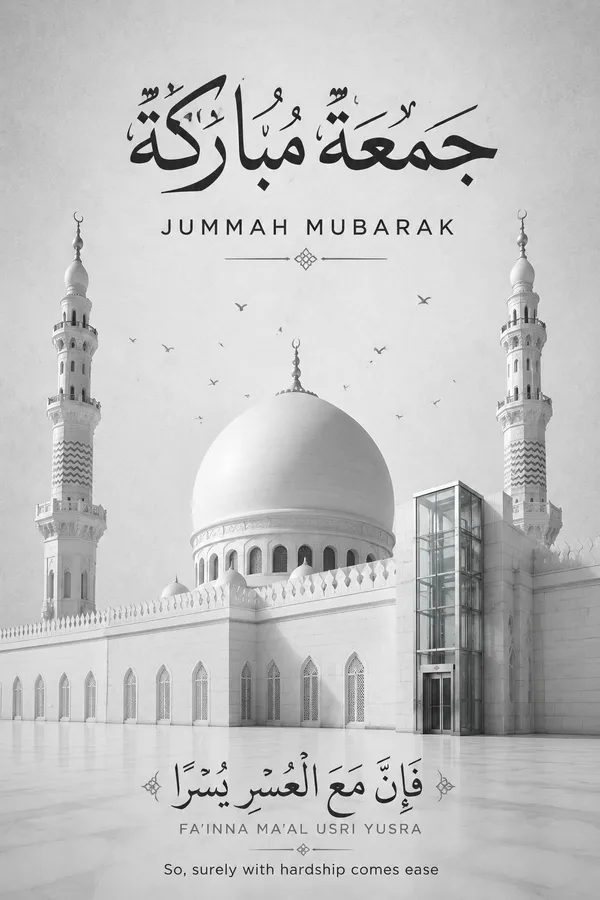
A minimalist and elegant Subha Bakhair greeting card design centered on a serene architectural composition. The scene features the iconic white dome and two minarets of Al-Masjid al-Quba rendered in a clean, sophisticated aesthetic. A subtle, modern elevator glass lift is integrated into the side of the mosque structure, featuring sleek brushed steel and transparent glass panels that reflect the surrounding courtyard light. Tiny, graceful silhouettes of birds are scattered near the dome, adding a sense of movement and scale.
Typography and Calligraphy
At the top, prominent bold black Arabic calligraphy reads Jummah Mubarak, with the English translation placed directly underneath in a crisp, modern sans-serif font. At the bottom, exquisite Arabic calligraphy displays the Quranic verse لَا يُكَلِّفُ اللَّهُ نَفْسًا إِلَّا وُسْعَهَا, followed by its English transliteration and the text Allah does not burden a soul beyond that it can bear, maintaining a clear and balanced visual hierarchy.
Lighting and Atmosphere
Soft, diffused daylight creates a calm and spiritual atmosphere, emphasizing the clean lines of the architecture. The lighting is high-key and even, avoiding harsh shadows to maintain a professional, corporate, and modern feel. The air feels crisp and still, with a sense of quiet reverence.
Material and Color Palette
The background is a textured light grey, reminiscent of high-end stationery or premium paper stock. The color palette is strictly monochromatic grayscale, utilizing subtle gradients and clean whites, deep blacks, and soft greys to ensure a cohesive and sophisticated look.
Constraints
No oversaturated colors, no vibrant neons, no plastic textures, no distorted architectural elements, no blurry or low-resolution text, no extra watermarks or logos. Ensure the calligraphy is sharp and legible, and the integration of the lift is seamless and architecturally consistent.
Remix 作品
Remix还没有人 Remix,来做第一个属于你的版本。
使用这条图片提示词
- 01
从提示词开始
复制提示词,或点击生成按钮在生成器中打开。
- 02
加入你的想法
调整主体、场景或细节,按需添加参考素材。
- 03
生成前确认
检查模型与输出设置,每次生成的结果可能有所不同。