

이중턱을 자연스럽게 보정하는 AI 프롬프트 10가지: 실제 전후 비교

Promptsref 창립자
Promptsref 창립자이자 AI UGC 크리에이터로, 생성형 AI 워크플로, 프롬프트 엔지니어링, 크리에이터 교육을 전문으로 하며 소셜 미디어에서 4만 명 이상의 독자와 소통합니다.
이 글의 내용
마음에 드는 사진에서 턱 아래만 조금 정리하고 싶을 때가 있습니다. 그날의 웃음과 익숙한 얼굴형, 함께 찍힌 사람들의 표정까지 달라지는 건 바라지 않죠.
이중턱 보정 프롬프트는 없앨 부분만큼 남겨야 할 부분도 구체적으로 적어야 합니다. 촬영 상황별로 시험한 프롬프트 10개와 각각의 생성 원본, 실제 편집 결과를 함께 소개합니다.
Reddit의 결혼식 사진 보정 요청에서도 본래 인상을 유지한 결과는 좋은 반응을 얻었지만, 목을 길게 늘린 결과에는 비판이 나왔습니다. AI로 보정할 때도 먼저 그 사람의 인상이 그대로인지 보고, 그다음 턱 아래가 자연스러운지 확인하세요.
내 사진에 프롬프트 적용하기
- 선명한 원본을 준비하세요. 턱과 목 윗부분, 근처의 옷깃이나 장신구가 보이는 사진이 좋습니다. 여러 번 캡처하거나 심하게 압축한 사진은 피부의 세부 질감을 판단하기 어렵습니다.
- 원본을 참조 이미지로 넣으세요. 이미지 기반 AI 생성기에서 참조 이미지 추가(Add reference image)를 선택하고 이미지 입력을 지원하는 모델을 고릅니다. 원본을 넣지 않으면 모델이 보존해야 할 실제 얼굴을 알 수 없습니다.
- 가장 비슷한 상황을 고르세요. 조명과 촬영 각도가 가까운 예시를 선택하고 옷차림, 인물 위치를 내 사진에 맞게 바꿉니다. 화면 비율은 원본과 맞추세요. 이 글의 예시는 4:3으로 생성했습니다.
- 한 번 생성한 뒤 항목별로 비교하세요. 눈, 입, 얼굴 너비, 목 길이, 배경부터 확인합니다. 얼굴이 달라졌다면 그 결과에 수정을 거듭하지 말고 원본으로 돌아가세요.
직접 쓸 때는 수정할 사람 + 턱 아래의 구체적인 수정 + 강도 + 보존할 요소 순서로 정리하면 됩니다. 예를 들어 “가운데 초록색 옷을 입은 사람의 턱 아래 접힌 부분을 조금 줄이고, 얼굴 너비와 웃음, 목 길이, 피부 질감, 양옆 사람은 그대로 유지해 줘”라고 적습니다.
영문 지시문을 처음부터 쓰기 어렵다면 AI 프롬프트 생성기로 사진 설명을 편집 지시문으로 정리할 수 있습니다. 이 글의 프롬프트 10쌍도 해당 도구로 만들었습니다. 내 사진에는 편집 프롬프트만 사용하고, 접힌 영역의 원본 생성 프롬프트는 가상 예시를 재현할 때 사용하세요.
촬영 상황별 프롬프트
모든 ‘편집 전’ 사진은 AI로 만든 가상의 성인입니다. 편집본은 각각의 원본을 참조 이미지로 넣어 생성했습니다. 사진 보정 예시이며 실제 체형 변화나 미용 시술의 효과를 보여 주는 자료가 아닙니다.
재현과 비교가 가능하도록 실험에 사용한 영문 프롬프트를 그대로 실었습니다. 각 예시에는 모델이 지시를 완전히 따르지 못한 부분도 적었습니다.
실험 설정: Promptsref에서 GPT Image 2.5 Sunburst로 표시된 모델, 1K, 4:3을 사용했고 편집마다 해당 원본 한 장만 참조했습니다. 사이트 워터마크는 유지했으며, 같은 1K 설정에서도 실제 파일의 픽셀 크기는 달랐습니다.
1. 일상 인물 사진: 작은 수정부터 시작하기
편안한 표정과 단순한 구도의 독사진에 쓰기 좋습니다. woman과 beige background를 실제 인물과 배경으로 바꾸되, 얼굴 너비와 턱 아래 자연스러운 그림자를 유지하라는 조건은 남겨 두세요.
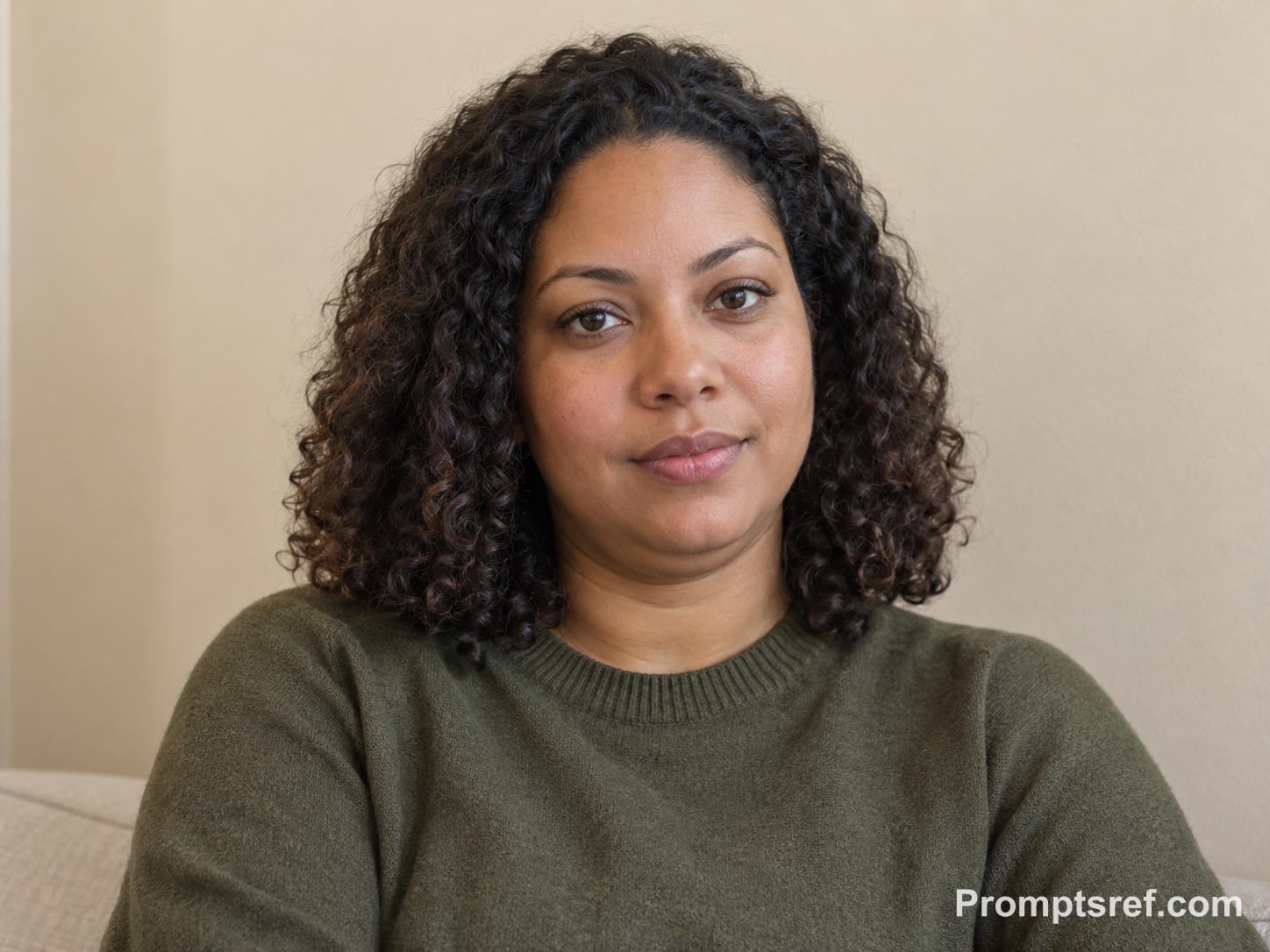
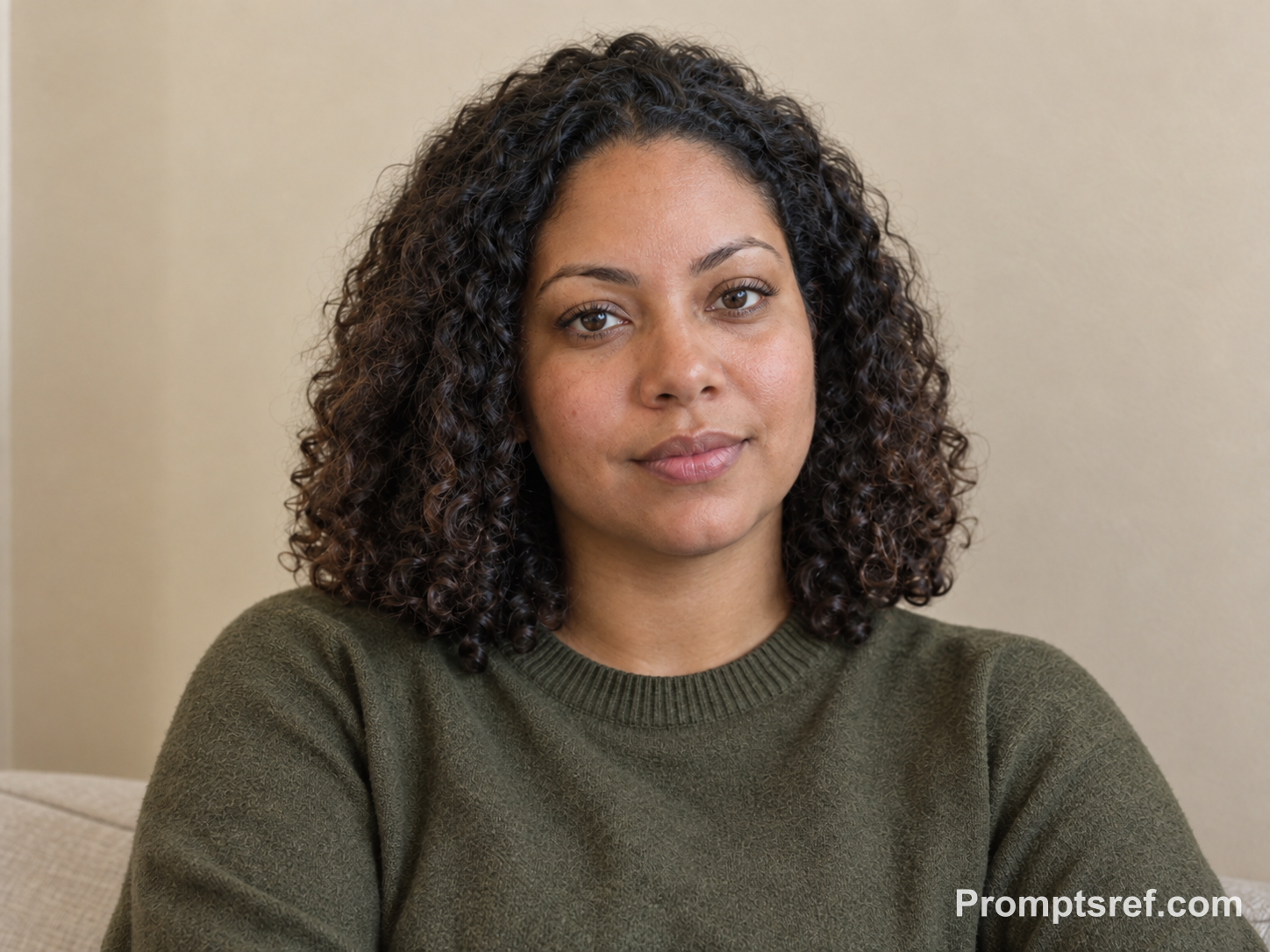
실제 결과: 턱 아래 두 번째 접힘이 눈에 띄게 줄었고 곱슬머리, 입을 다문 표정, 스웨터는 알아볼 수 있게 유지됐습니다. 다만 목 피부가 매끈해지고 피부와 옷감의 작은 무늬도 다시 그려졌으므로 윤곽과 질감을 함께 확인해야 합니다.
복사해서 쓰는 편집 프롬프트 · 실험에 사용한 영문 원문:
Using this exact before image, remove only the secondary under-chin fold beneath the chin. Preserve the woman’s identity, facial features, face width, chin projection, neck length, age, body size, hairstyle, clothing, pose, expression, lighting, camera perspective, and beige background. Keep ordinary pores and skin texture, with an anatomically plausible neck contour and some natural shadow remaining under the chin. Do not slim the overall face or alter any other feature.
가상 원본을 만든 프롬프트 보기
Create a realistic fictional adult woman in her early thirties, seated against a softly lit beige wall for a neutral everyday portrait. She has medium-brown skin, shoulder-length natural curls, an olive crew-neck sweater, relaxed posture, and a calm closed-mouth expression. Show a clearly visible but ordinary secondary double-chin fold beneath her chin, with natural skin texture, realistic neck anatomy, soft window lighting, and a simple uncluttered background. Horizontal 4:3 composition.
2. 아래에서 찍은 셀카: 원래의 촬영 각도 유지하기
휴대전화를 얼굴보다 낮게 들면 턱 아래 접힘이 더 드러날 수 있습니다. 시점까지 눈높이로 바꾸면 턱만 고친 건지 머리 전체를 다시 그린 건지 구분하기 어려우므로 원래 각도를 유지하세요.
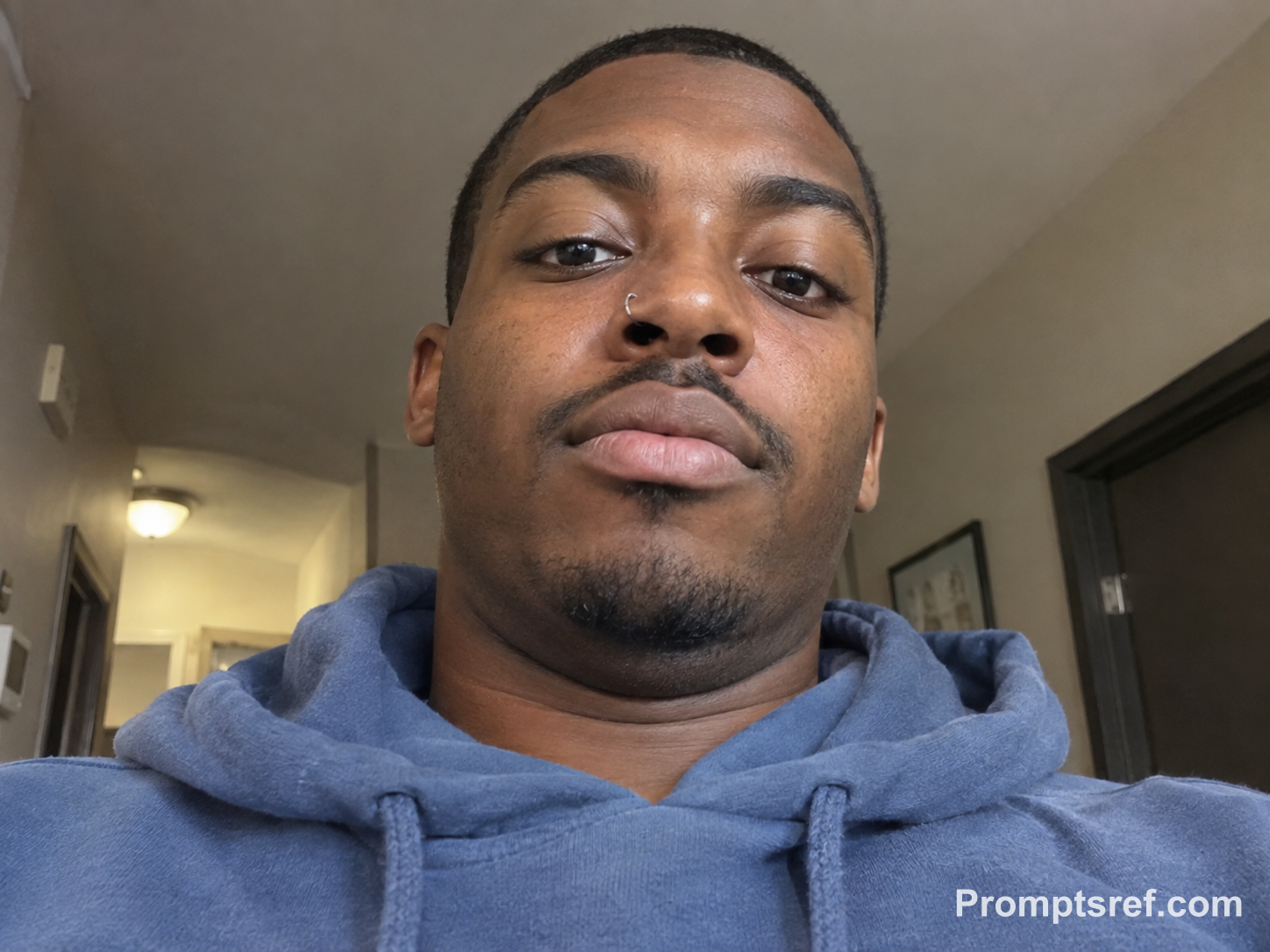
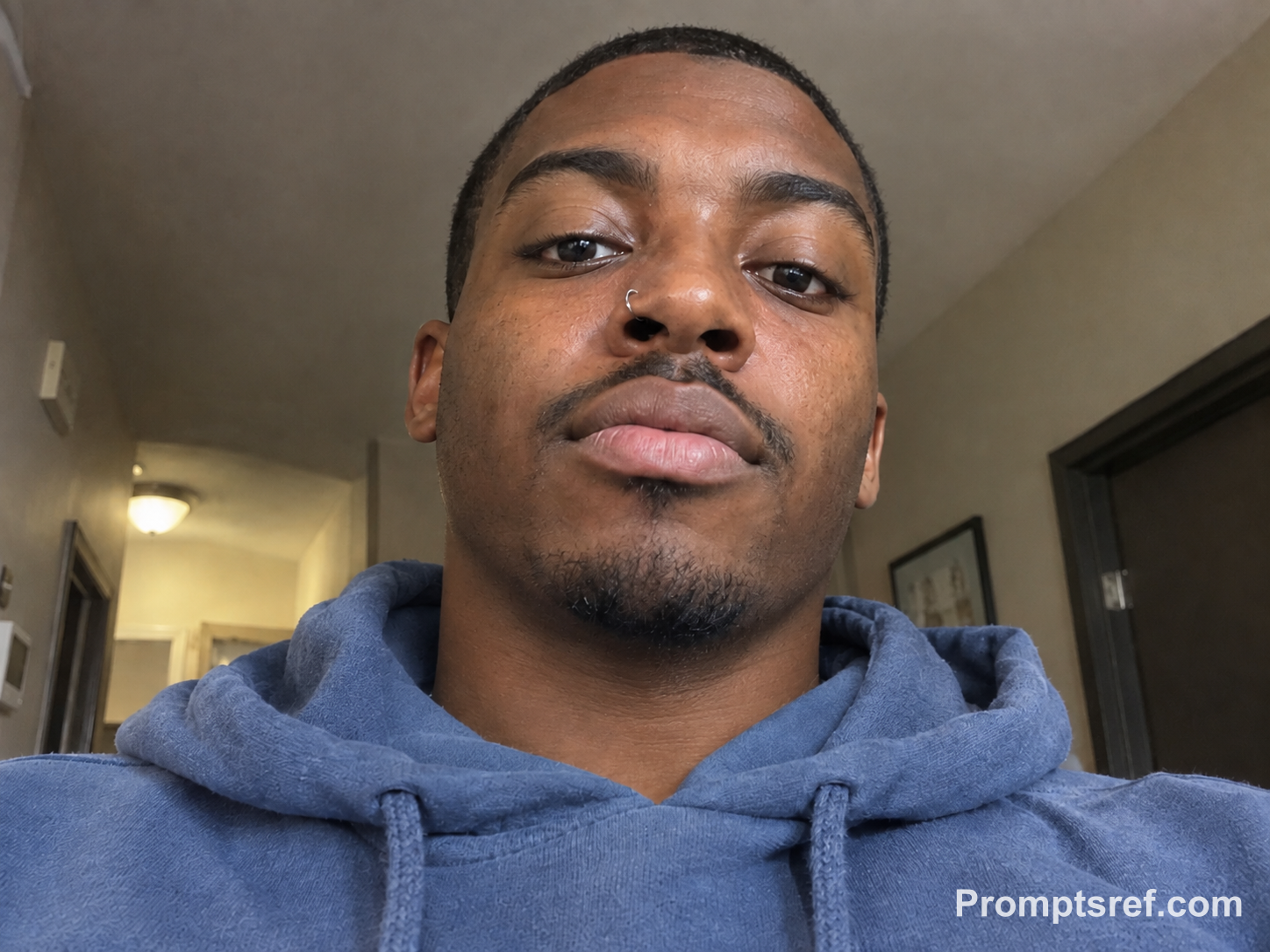
실제 결과: 후드티 목 부분 위의 가로 접힘이 줄고 약간 아래에서 올려다보는 셀카 시점은 남았습니다. 목 피부는 더 매끈해졌으므로 원래의 잔주름을 살리고 싶다면 이 부분을 확대해 보세요.
복사해서 쓰는 편집 프롬프트 · 실험에 사용한 영문 원문:
Using this exact before image, remove only the secondary under-chin fold visible from the low-angle selfie perspective. Preserve the man’s identity, facial proportions, face width, chin projection, neck length, age, body size, hairstyle, nose ring, hoodie, pose, expression, phone perspective, lighting, and apartment hallway. Retain realistic pores and a plausible natural shadow beneath the chin. Do not change the jawline broadly, slim the face, or modify the background.
가상 원본을 만든 프롬프트 보기
Create a realistic fictional adult man in his late twenties taking a low-angle phone selfie from slightly below face level. He has dark skin, closely cropped hair, a small nose ring, and a faded blue hoodie. His eyes look into the phone with a neutral, mildly curious expression. The low perspective clearly shows an ordinary secondary double-chin fold, natural skin texture, realistic indoor hallway lighting, slight phone-camera perspective, and a softly blurred apartment background. Horizontal 4:3 composition.
3. 결혼식에서 웃는 사진: 웃음부터 확인하기
활짝 웃는 사진은 턱보다 표정을 먼저 비교하세요. 입꼬리와 볼의 웃음 주름, 귀걸이 위치가 원본과 같은지 확인한 다음 결과를 선택합니다.
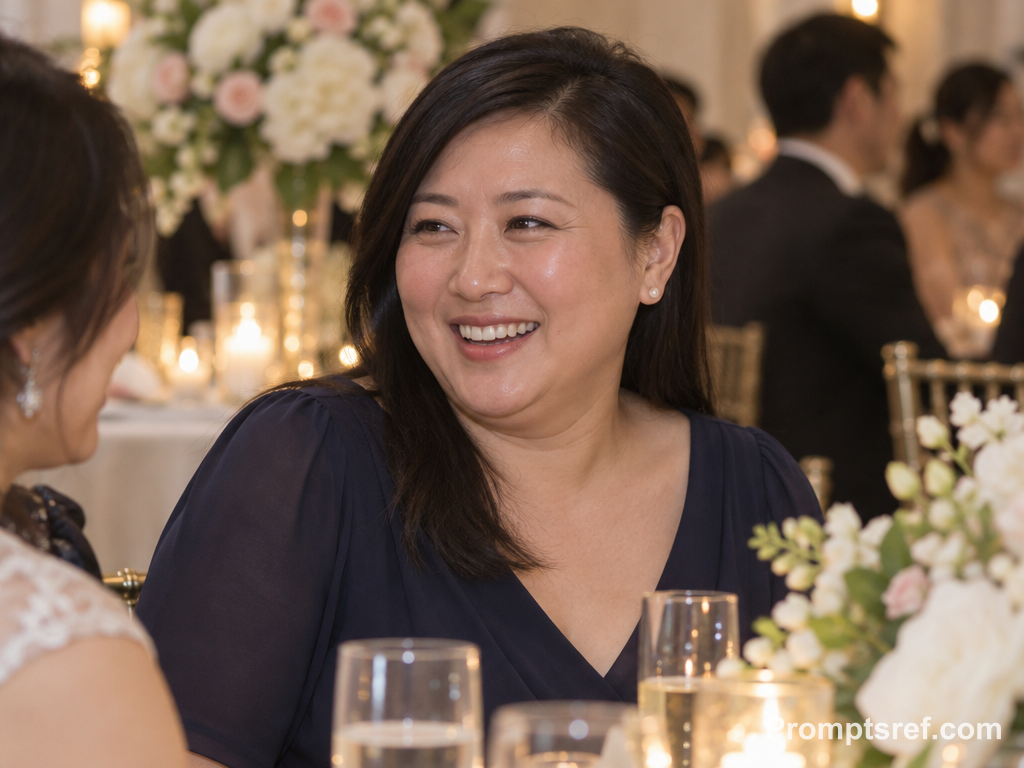
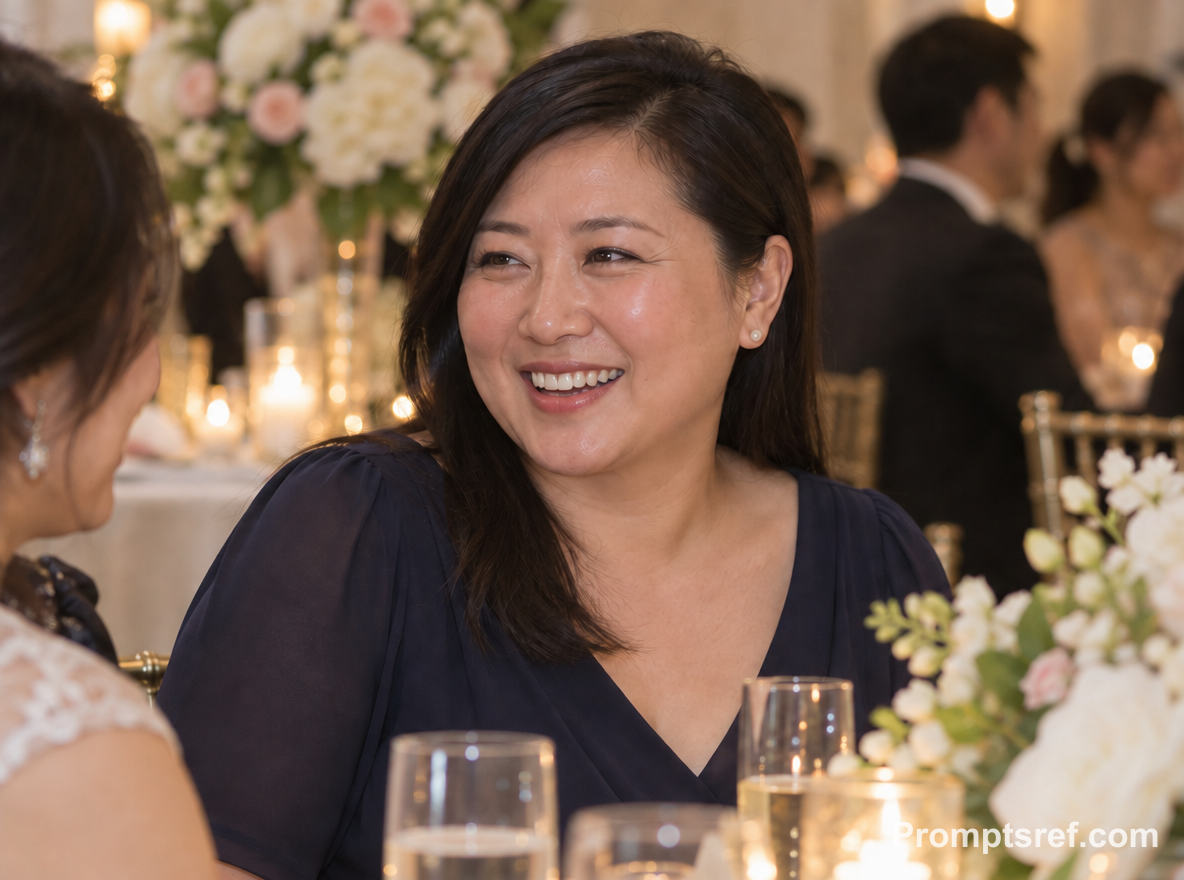
실제 결과: 웃는 인상과 진주 귀걸이, 따뜻한 연회장 조명은 비슷하게 유지됐고 턱 아래 접힘은 줄었습니다. 하지만 목 윗부분도 매끈해졌습니다. 선 하나만 지운 것이 아니라 턱에서 목으로 이어지는 부분까지 부드럽게 바뀐 셈입니다.
복사해서 쓰는 편집 프롬프트 · 실험에 사용한 영문 원문:
Using this exact before image, remove only the secondary under-chin fold beneath the smiling guest’s chin. Preserve her identity, smile, facial expression, face width, chin projection, neck length, age, body size, pearl earrings, hairstyle, navy dress, pose, warm reception lighting, floral background, and camera framing. Keep natural smile lines, pores, and a believable small shadow under the chin. Do not change makeup, facial shape, body proportions, or clothing.
가상 원본을 만든 프롬프트 보기
Create a realistic fictional adult East Asian woman in her forties attending a wedding reception, smiling naturally toward a nearby friend. She wears a navy dress, small pearl earrings, and her straight black hair is tucked behind one ear. Frame her from the chest up beside softly glowing floral decorations. Show a clearly visible but ordinary secondary double-chin fold while preserving natural smile lines, skin texture, warm indoor lighting, and realistic candid detail. Horizontal 4:3 composition.
4. 업무용 프로필 사진: 셔츠 깃으로 목 길이 확인하기
옷깃은 목이 늘어났는지 확인하는 기준점이 됩니다. 턱 끝과 옷깃 사이가 확 벌어졌다면 접힘을 줄이는 과정에서 목 길이도 달라졌을 수 있습니다.


실제 결과: 셔츠 깃 위의 접힌 부분이 줄고 안경과 옷깃의 형태는 선명하게 남았습니다. 다만 자연스러운 목주름 몇 개도 옅어졌습니다. 나이 든 인상을 그대로 살리고 싶다면 수정 강도를 낮추세요.
복사해서 쓰는 편집 프롬프트 · 실험에 사용한 영문 원문:
Using this exact before image, remove only the secondary under-chin fold while keeping the man’s identity completely consistent. Preserve his glasses, salt-and-pepper hair, facial features, face width, chin projection, neck length, age, body size, shirt collar, blazer, posture, expression, professional lighting, office background, and framing. Maintain natural pores, skin texture, and an anatomically plausible modest shadow beneath the chin. Do not sharpen, retouch, beautify, or globally slim his face.
가상 원본을 만든 프롬프트 보기
Create a realistic fictional adult Black man in his fifties for a corporate headshot, wearing a light-blue button-up shirt with the collar visible beneath a charcoal blazer. He has short salt-and-pepper hair, rectangular glasses, and a composed expression. Photograph him against a softly lit cool-gray office background. Show a clearly visible but ordinary secondary double-chin fold, authentic skin texture, subtle under-chin shadow, professional lighting, and a straight-on chest-up pose. Horizontal 4:3 composition.
5. 옆얼굴과 비스듬한 얼굴: 코·입술·턱 끝의 관계 유지하기
코끝, 입술, 턱 끝, 귀의 윤곽을 기준으로 봅니다. 턱을 앞으로 내미는 것과 턱 아래 접힘을 줄이는 것은 다른 수정이므로 지시문에서도 구분하세요.
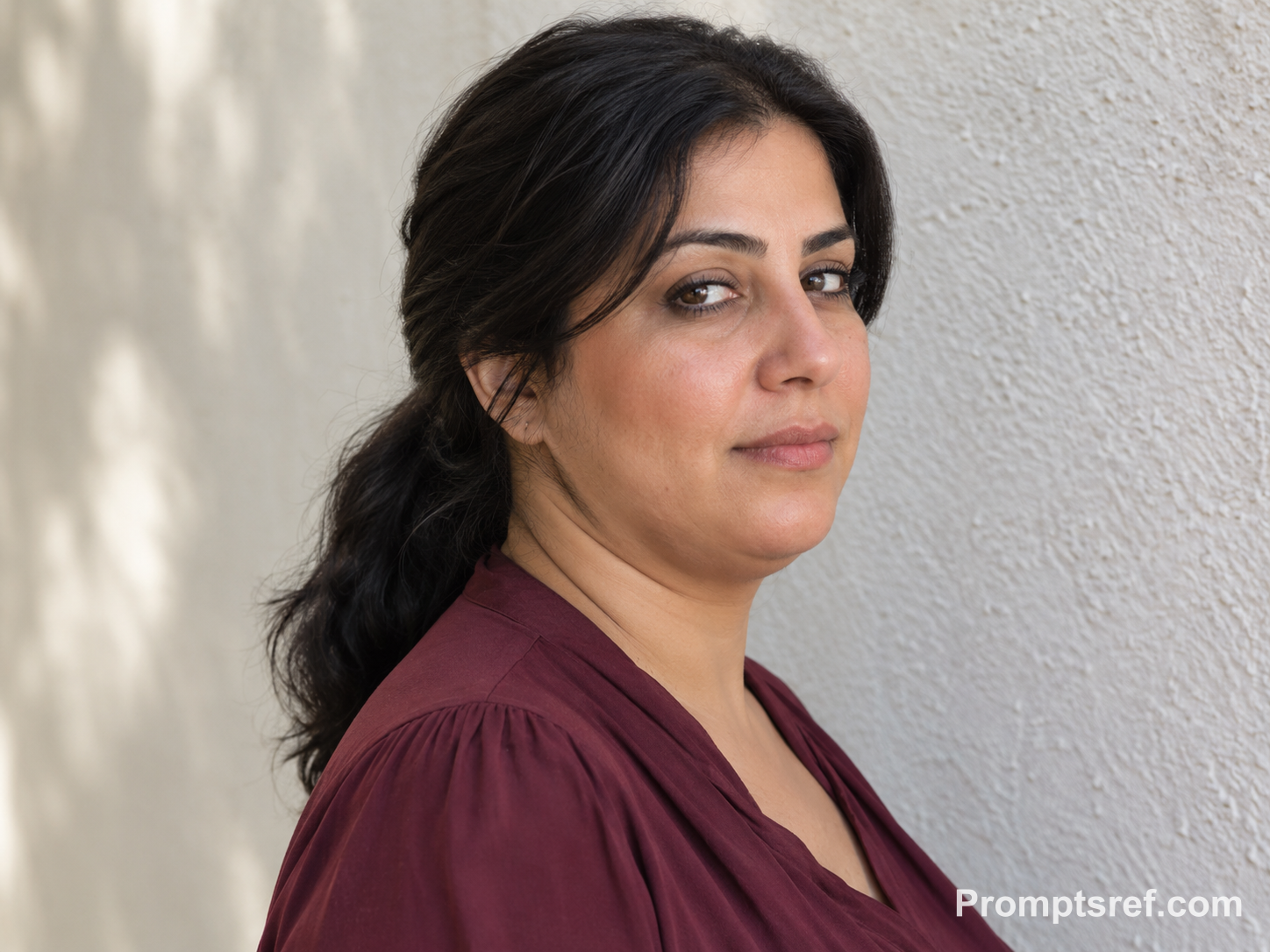
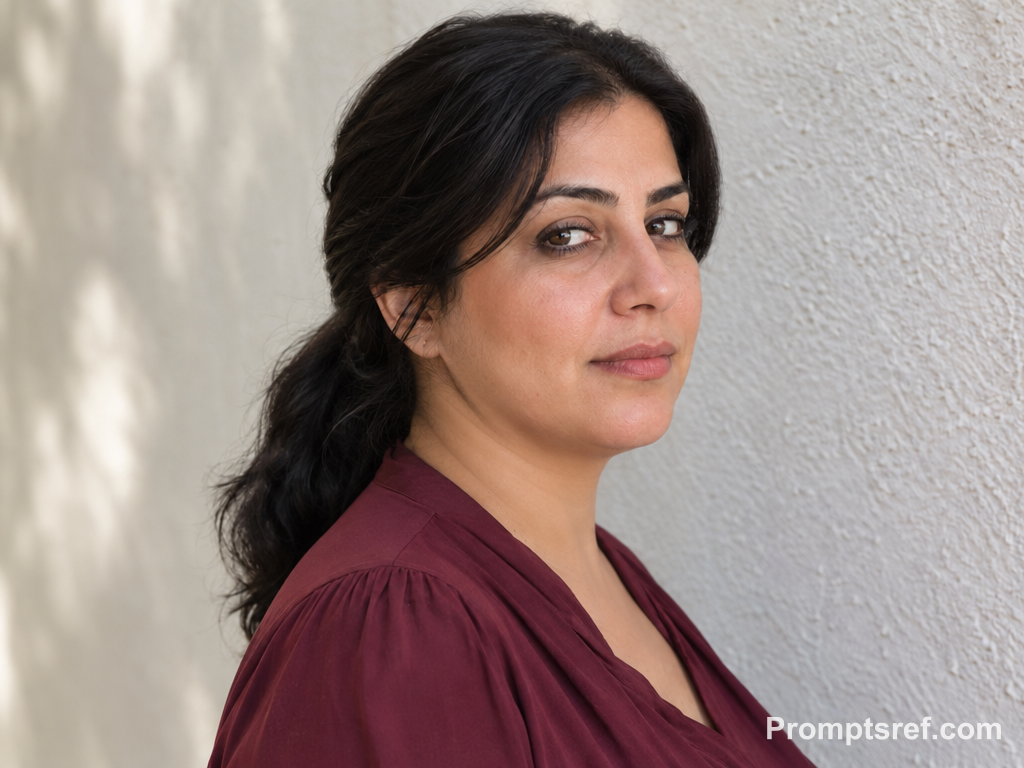
실제 결과: 턱 아래의 작은 접힘이 줄었으며 코, 입술, 낮게 묶은 머리, 배경 벽의 위치도 대체로 비슷합니다. 턱과 목의 경계가 또렷해졌으므로 더 부드러운 결과를 원한다면 이 윤곽을 중심으로 확인하세요.
복사해서 쓰는 편집 프롬프트 · 실험에 사용한 영문 원문:
Using this exact before image, remove only the secondary under-chin fold visible in the three-quarter view. Preserve her identity, profile landmarks, face width, chin projection, neck length, age, body size, ponytail, burgundy blouse, pose, gaze, expression, afternoon lighting, wall texture, and camera angle. Retain natural skin pores and a plausible contour with mild residual shadow beneath the chin. Do not straighten the face, alter the nose or lips, or perform overall slimming.
가상 원본을 만든 프롬프트 보기
Create a realistic fictional adult Middle Eastern woman in her early forties, photographed in a three-quarter side portrait while looking slightly past the camera. She has warm olive skin, a loose burgundy blouse, and dark hair gathered in a low ponytail. Use soft afternoon light beside a pale textured wall. Clearly show an ordinary secondary double-chin fold from this angle, with realistic facial structure, natural skin texture, relaxed posture, and a quiet expression. Horizontal 4:3 composition.
6. 짧은 수염이 있는 얼굴: 수염 끝과 결 살리기
생성 후 수염 아래쪽 경계를 확대해 봅니다. 턱 밑이 평평한 검은 덩어리처럼 보인다면 원본으로 돌아가 수염 한 올 한 올의 질감과 자라는 방향을 유지하라고 적으세요.
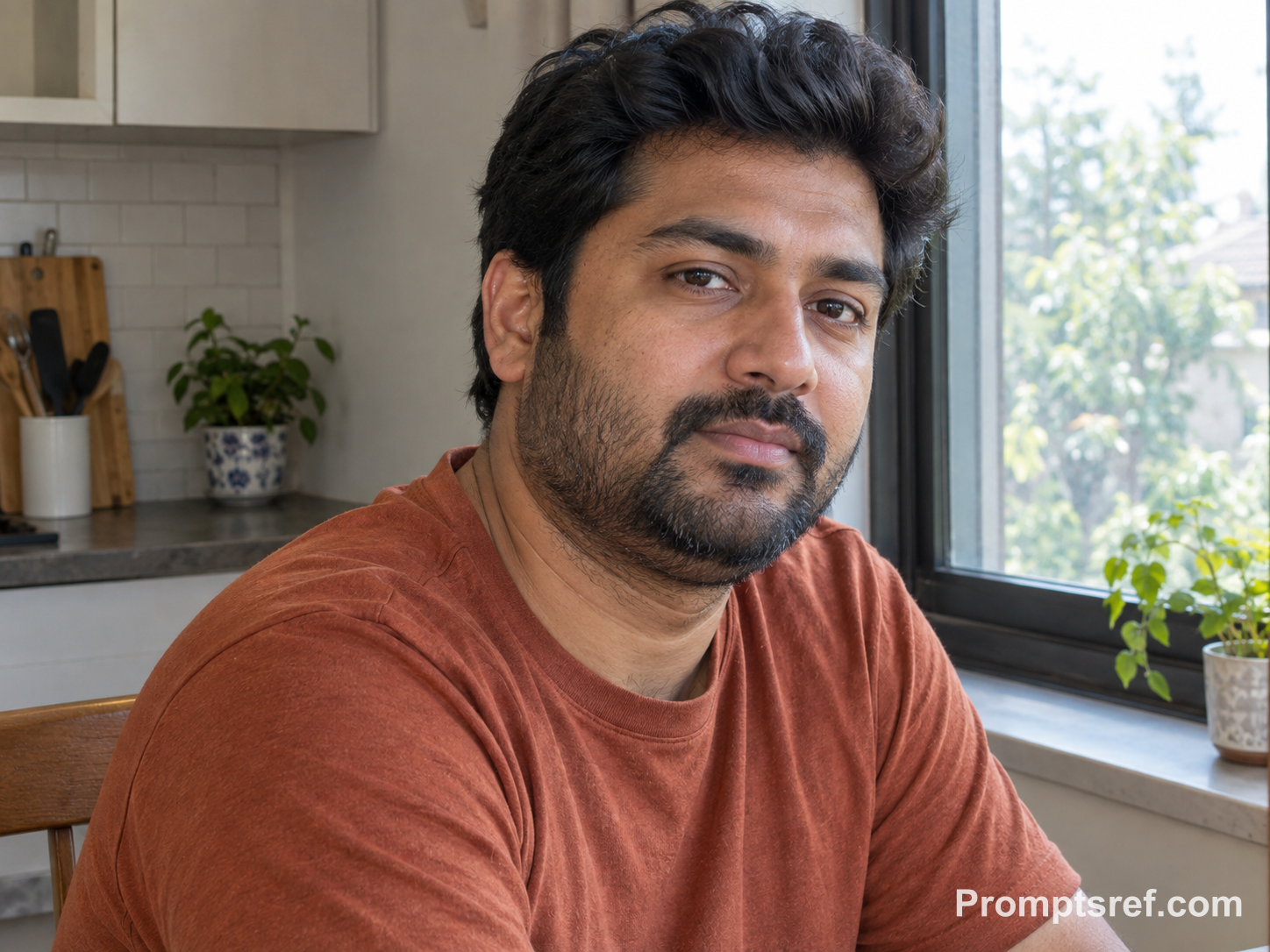
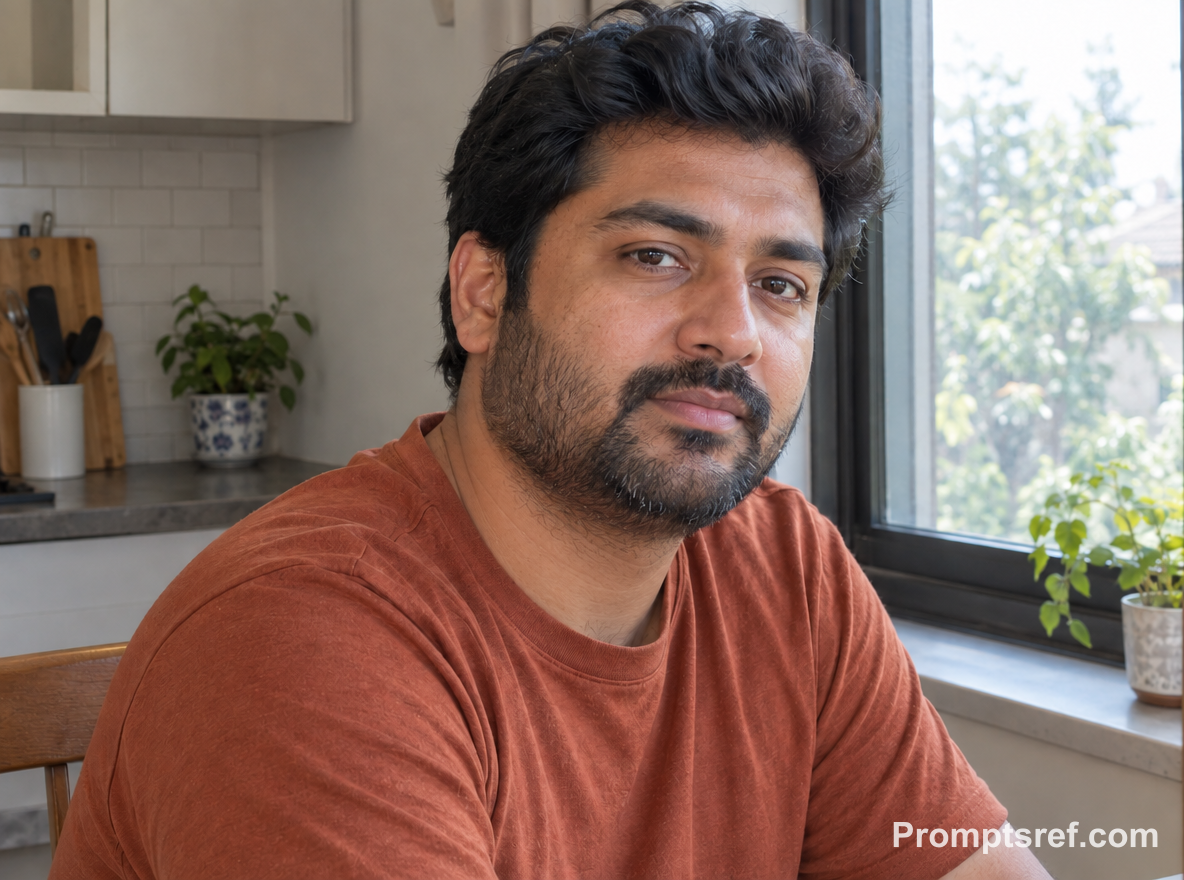
실제 결과: 수염 아래 접힘이 조금 옅어졌고 짧은 수염의 결과 창가 조명은 남았습니다. 변화가 크지 않은 예시입니다. 수정 강도를 올리기 전에 수염 경계가 흐려지지 않았는지 확인하세요.
복사해서 쓰는 편집 프롬프트 · 실험에 사용한 영문 원문:
Using this exact before image, remove only the secondary under-chin fold beneath the bearded man’s chin. Preserve his identity, beard shape and individual hairs, facial features, face width, chin projection, neck length, age, body size, hairstyle, T-shirt, posture, expression, window light, and kitchen background. Keep realistic pores, beard texture, and an anatomically plausible soft shadow under the chin. Do not erase the beard, reshape the jaw broadly, or alter the face.
가상 원본을 만든 프롬프트 보기
Create a realistic fictional adult South Asian man in his mid-thirties with a short, neatly uneven beard and thick dark hair. He wears a plain rust-colored T-shirt and sits near a kitchen window, turned slightly toward the camera with a thoughtful neutral expression. Make the ordinary secondary double-chin fold clearly visible beneath the beard line, while preserving individual hairs, natural skin texture, realistic daylight, and a lived-in but uncluttered background. Horizontal 4:3 composition.
7. 어르신 사진: 이중턱과 자연스러운 목주름 구분하기
‘턱 바로 아래의 특정 접힘’만 줄이고 다른 주름은 보존하라고 명시합니다. 나이와 본래 인상을 살리는 작은 수정이 목적이라면 ‘목 전체를 매끈하게’ 같은 넓은 지시는 피하세요.
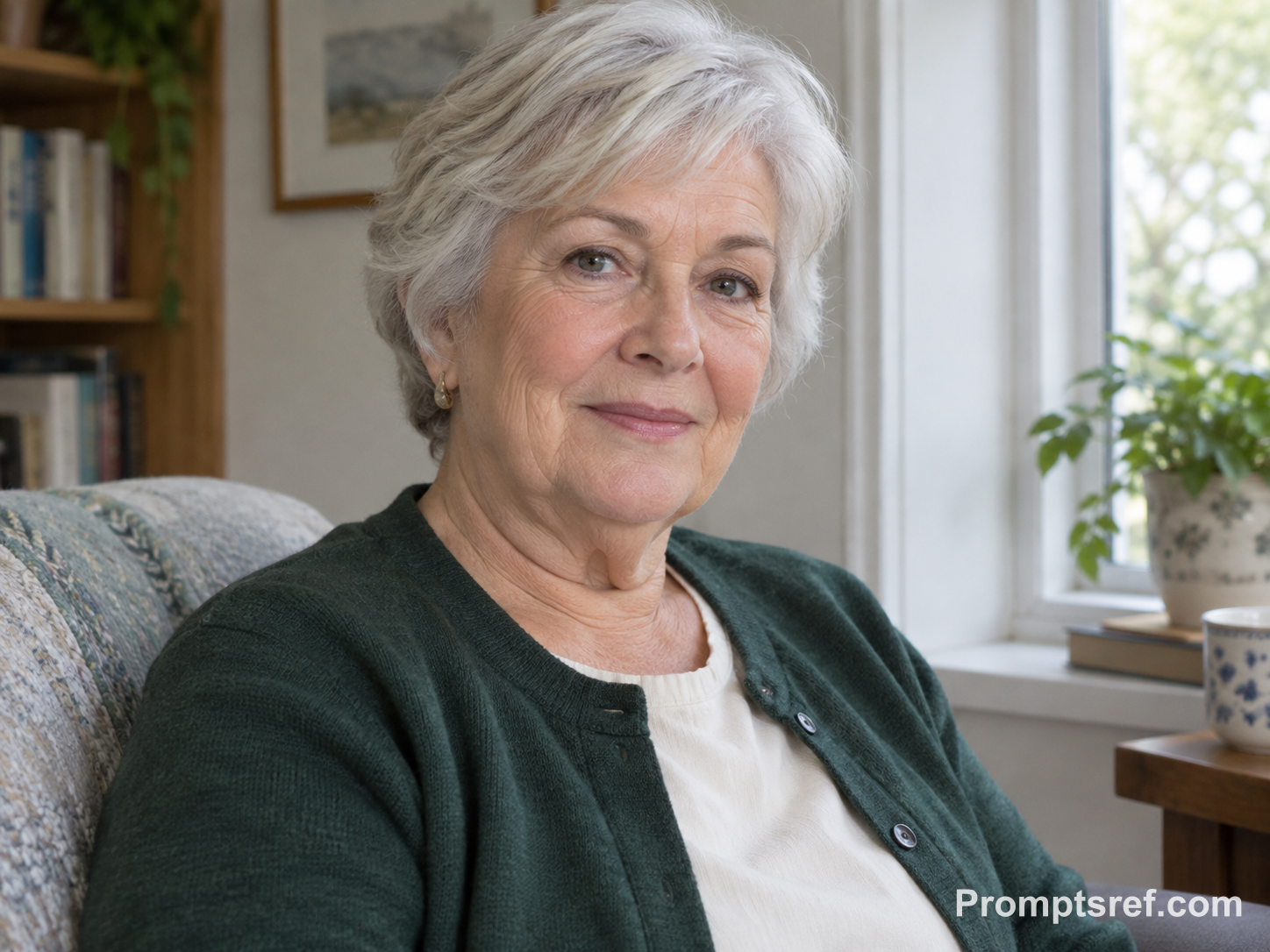
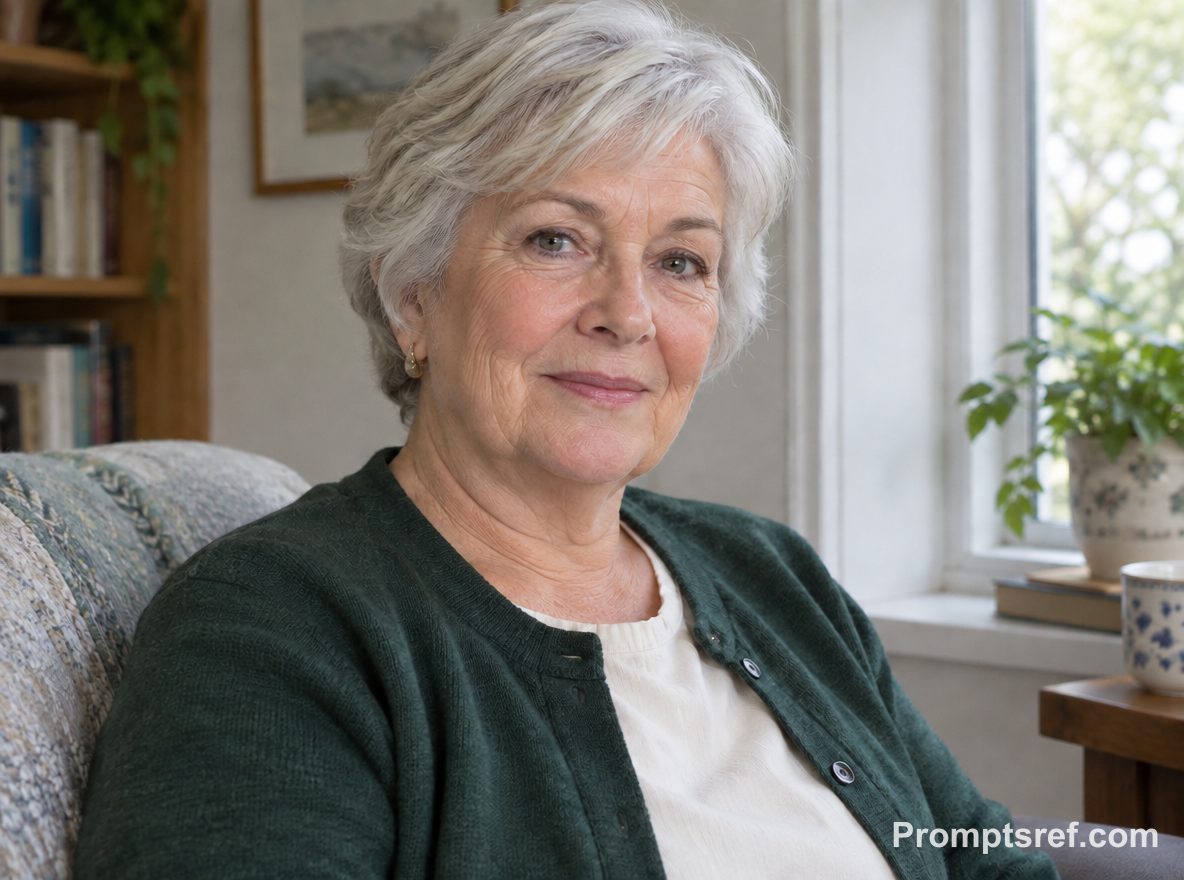
실제 결과: 턱 중앙 아래로 처진 접힘이 줄었고 눈가 주름과 목주름 상당 부분은 남았습니다. 주변 피부도 조금 다시 그려져, 텍스트 지시만으로 접힘 하나를 완전히 분리하기는 어렵다는 점을 보여 줍니다.
복사해서 쓰는 편집 프롬프트 · 실험에 사용한 영문 원문:
Using this exact before image, remove only the secondary under-chin fold beneath the older woman’s chin. Preserve her identity, age, silver hair, crow’s-feet, natural neck wrinkles, facial features, face width, chin projection, neck length, body size, clothing, posture, expression, daylight, and home background. Keep visible pores and age-related texture, leaving plausible natural shadow and folds that are not the targeted secondary fold. Do not rejuvenate, smooth, or reshape her face.
가상 원본을 만든 프롬프트 보기
Create a realistic fictional older adult woman in her seventies with short silver hair, gentle crow’s-feet, and naturally occurring neck wrinkles. She wears a forest-green cardigan over a cream blouse and sits near a window with a calm, attentive expression. Clearly show an ordinary secondary under-chin fold alongside authentic age-related skin texture and neck lines. Use soft daylight, modest home surroundings, and a documentary portrait style. Horizontal 4:3 composition.
8. 단체 사진: 위치와 옷 색으로 한 사람 지정하기
Reddit의 단체 사진 보정 요청에서도 오른쪽 여성을 자연스럽게 보정해 달라고 대상을 지정합니다. 아래의 center adult wearing the green shirt를 내 사진에서 한 사람만 가리키는 위치와 옷차림 설명으로 바꾸세요.
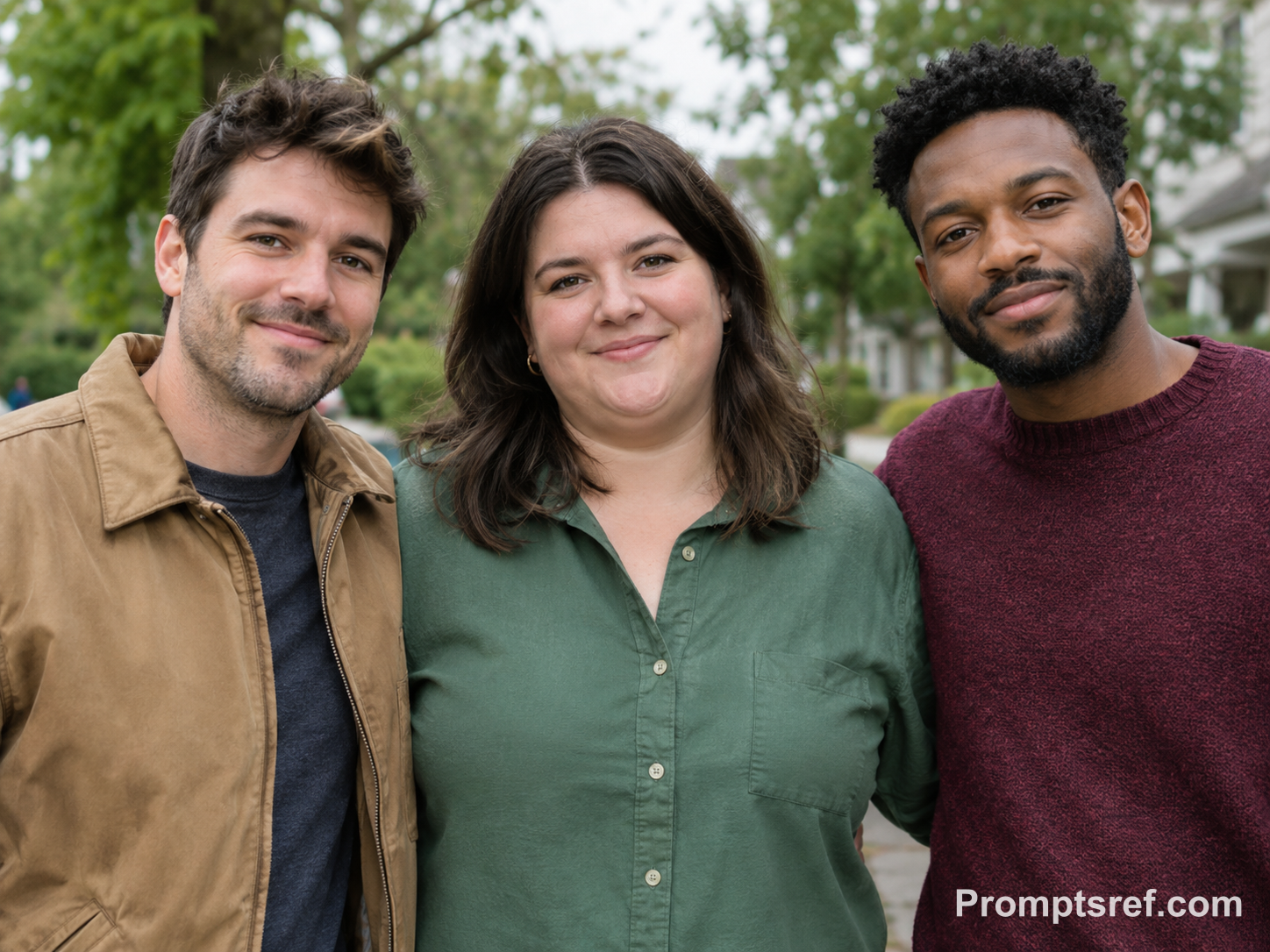
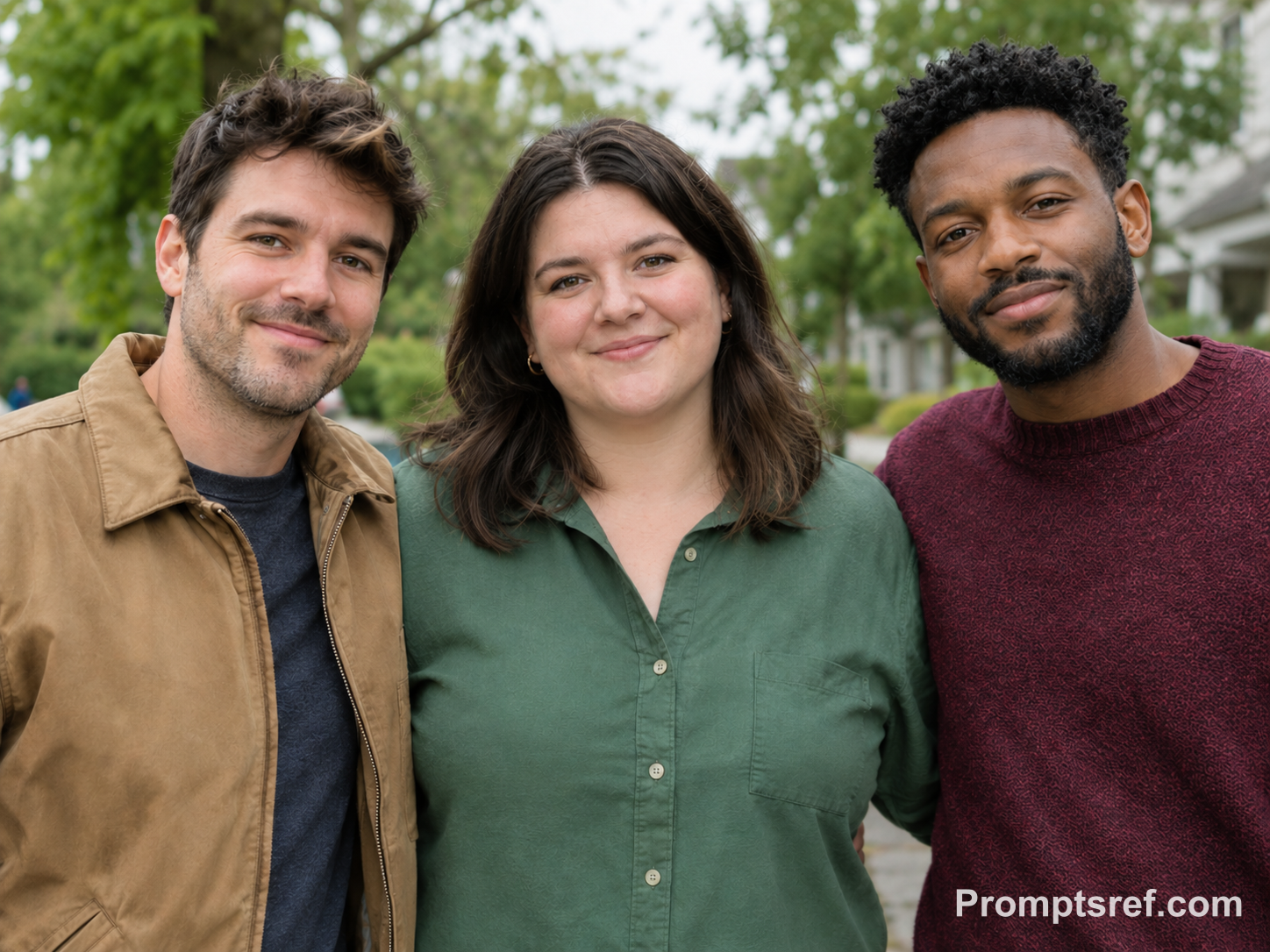
실제 결과: 가운데 초록색 옷을 입은 사람의 접힘이 줄었으며 양옆 사람의 표정과 위치도 알아볼 수 있게 남았습니다. 실제 단체 사진에서는 모든 얼굴을 100% 크기로 확인하세요. 작은 미리보기로는 다른 사람의 미묘한 얼굴 변화를 놓칠 수 있습니다.
복사해서 쓰는 편집 프롬프트 · 실험에 사용한 영문 원문:
Using this exact before image, remove only the secondary under-chin fold from the center adult wearing the green shirt. Edit no other person or feature. Preserve all three identities, faces, body sizes, ages, clothing, hairstyles, expressions, poses, spacing, lighting, shadows, camera perspective, and leafy background. Keep the center person’s natural skin texture and a plausible modest shadow beneath the chin. Do not slim the center face globally or alter either neighboring adult.
가상 원본을 만든 프롬프트 보기
Create a realistic fictional group photograph of three unrelated adult friends standing shoulder to shoulder outdoors in soft overcast light. The left person wears a tan jacket, the center person wears a green shirt, and the right person wears a burgundy sweater. All three have distinct identities and relaxed expressions. Make only the center adult’s ordinary secondary double-chin fold clearly visible, with natural skin texture, balanced spacing, and a leafy neighborhood background. Horizontal 4:3 composition.
9. 어두운 식당 사진: 입체감을 만드는 그림자 남기기
바꾸려는 것이 접힘인지 그림자인지, 둘 다인지 먼저 정합니다. 이 프롬프트는 따뜻한 천장 조명을 유지하면서 접힘을 줄입니다. 턱 아래의 어두운 부분을 모두 지우면 얼굴과 목이 평면적으로 보일 수 있습니다.
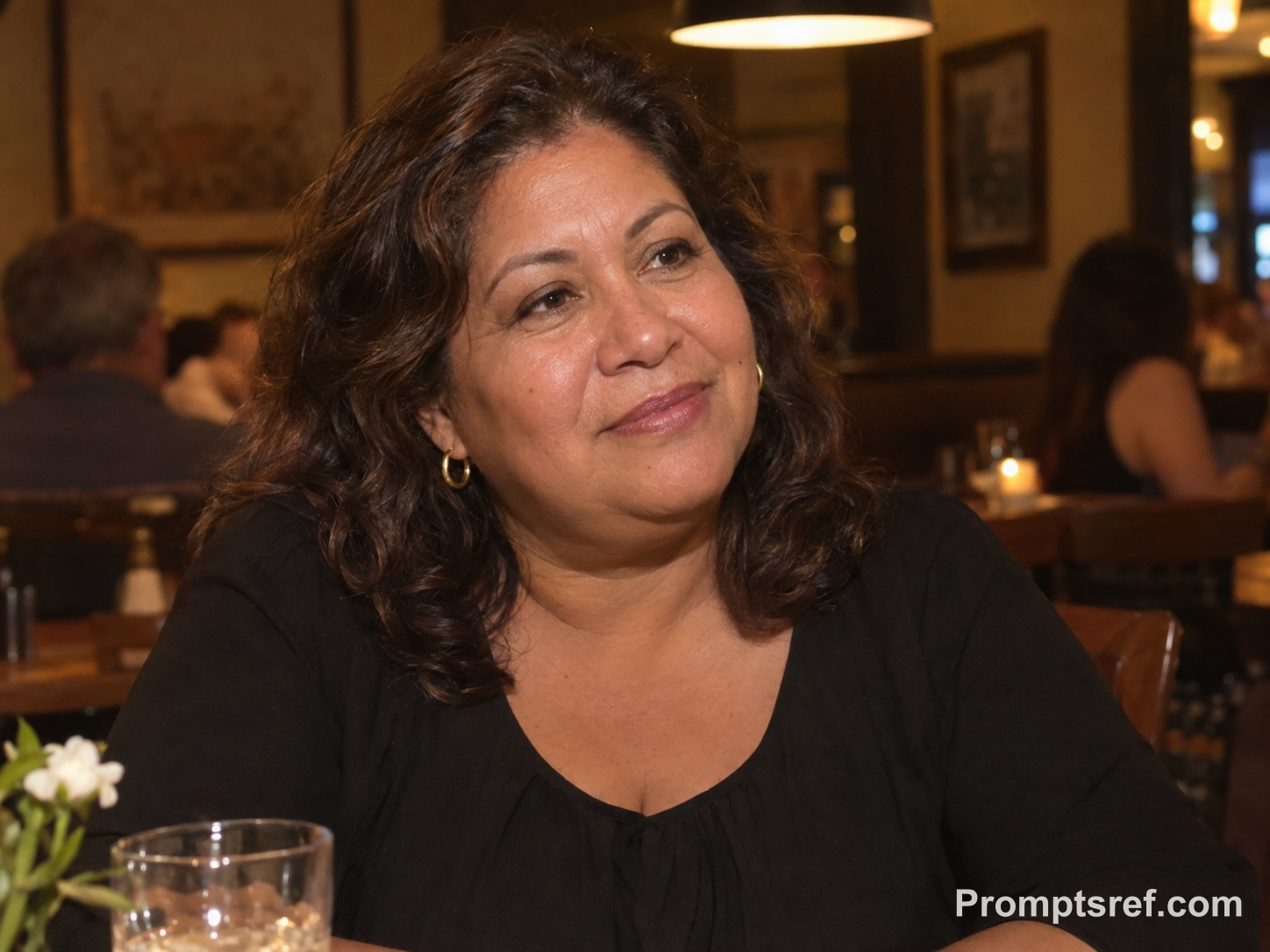
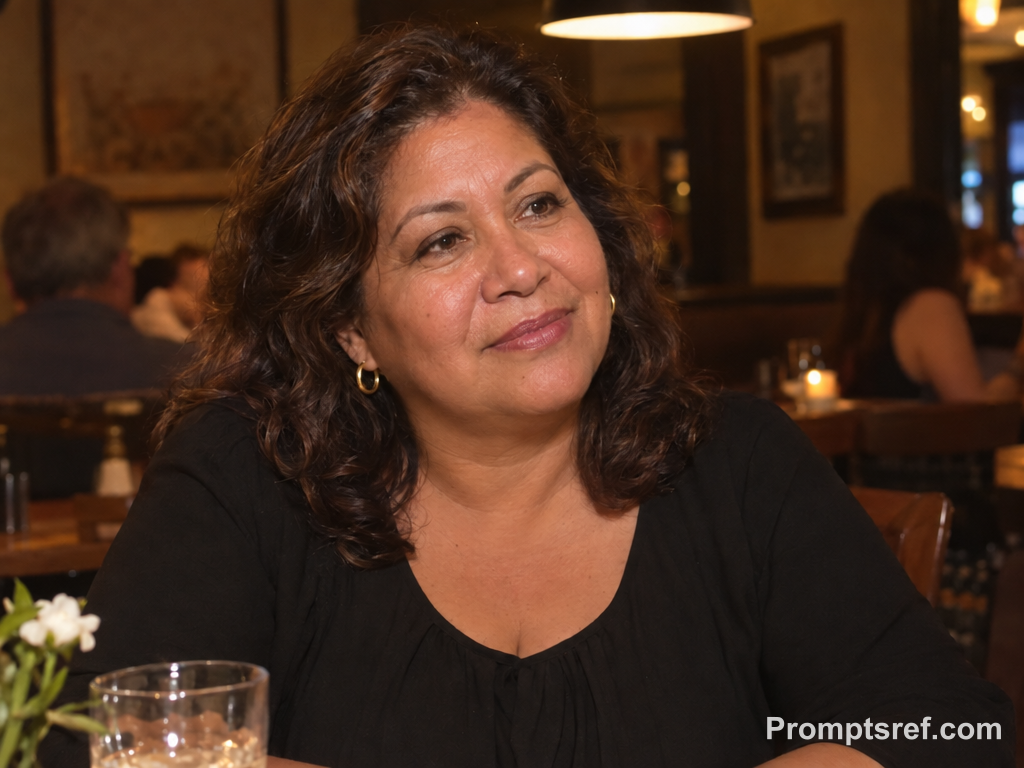
실제 결과: 턱 아래의 겹친 윤곽이 적당히 줄고 따뜻한 빛과 어두운 그림자는 남았습니다. 접힘을 완화하려고 목 전체를 정면 조명을 받은 것처럼 밝힐 필요는 없습니다.
복사해서 쓰는 편집 프롬프트 · 실험에 사용한 영문 원문:
Using this exact before image, remove only the secondary under-chin fold beneath the woman’s chin. Preserve her identity, facial features, face width, chin projection, neck length, age, body size, earrings, hairstyle, black blouse, listening pose, expression, warm restaurant lighting, strong overhead shadow, table setting, and background. Keep ordinary skin texture and some believable under-chin shadow. Do not brighten the image, smooth wrinkles, change makeup, or slim the face globally.
가상 원본을 만든 프롬프트 보기
Create a realistic fictional adult Latina woman in her late fifties seated at a warmly lit restaurant table during dinner. She wears a simple black blouse and small gold hoop earrings, with shoulder-length wavy hair and a relaxed expression while listening to someone off-camera. A strong but realistic overhead pendant creates a visible under-chin shadow and clearly reveals an ordinary secondary double-chin fold. Include natural skin texture and a softly blurred restaurant interior. Horizontal 4:3 composition.
10. 고개를 숙이고 웃는 순간: 그 표정 그대로 남기기
자연스럽게 터진 웃음 때문에 간직하고 싶은 사진에 쓰세요. 숙인 고개와 표정을 유지하고, remove가 지나치게 평평한 결과를 만든다면 gently reduce로 바꿔 자연스러운 접힘을 조금 남깁니다.
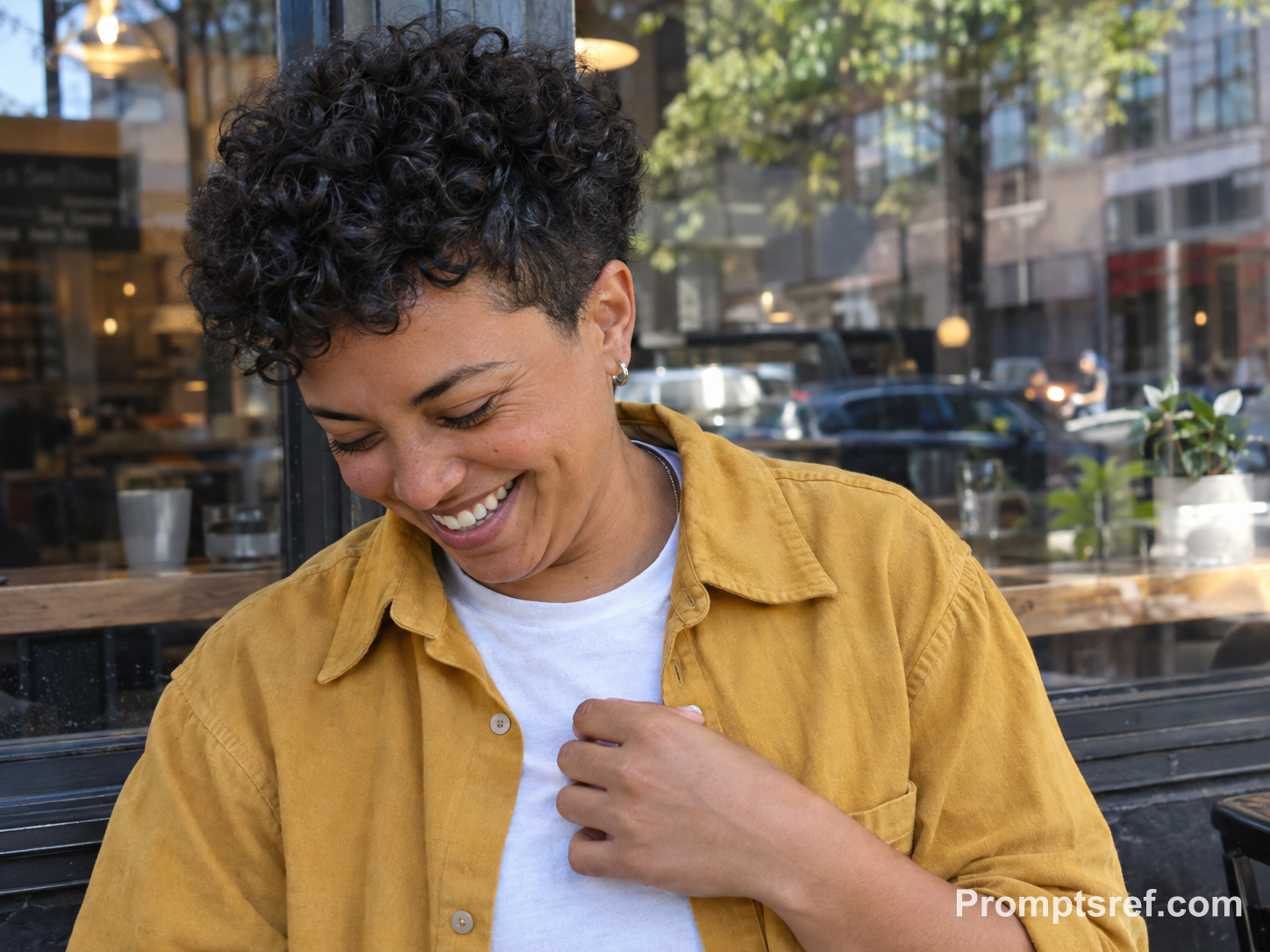
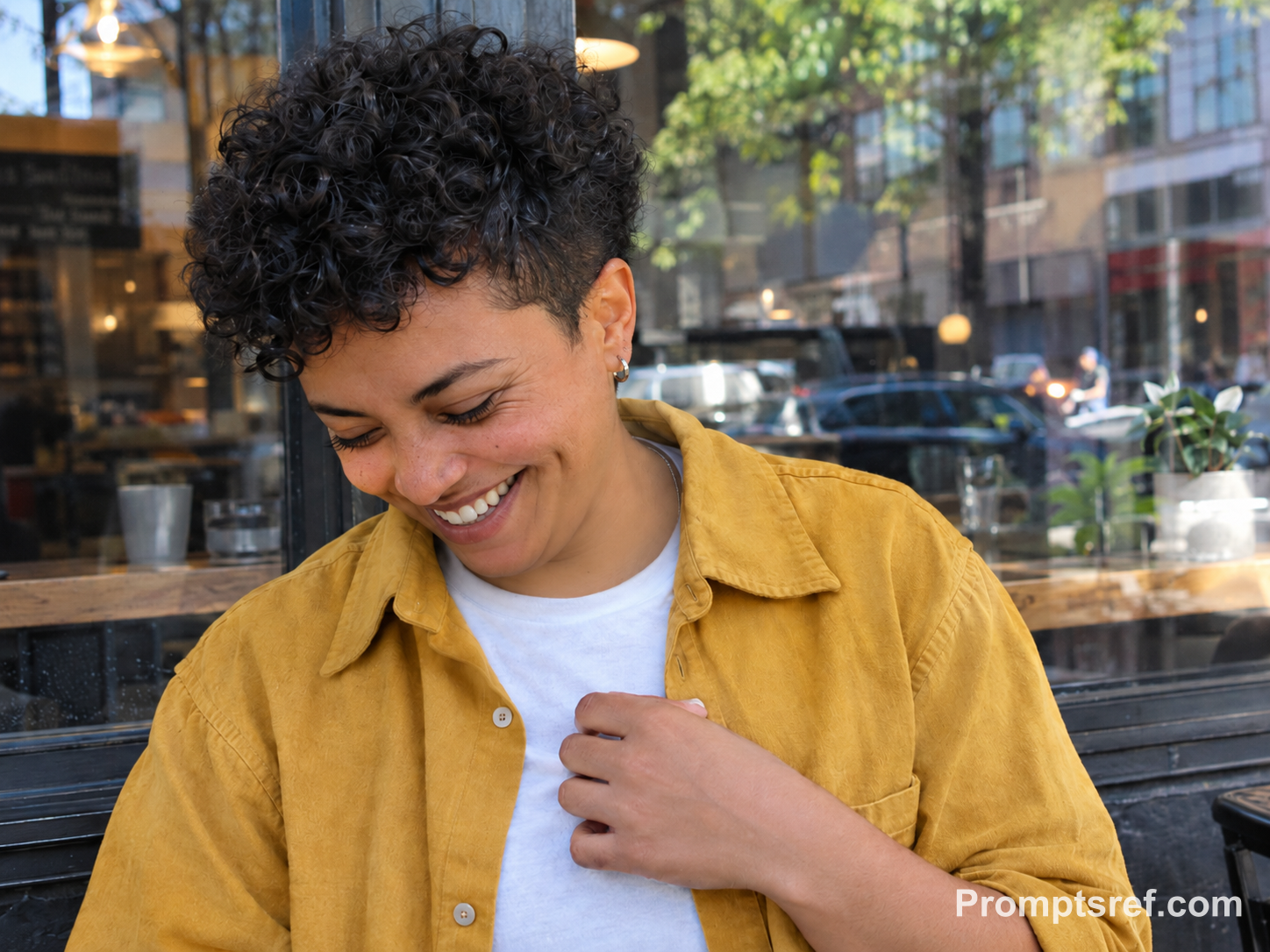
실제 결과: 숙인 고개, 환한 웃음, 가슴에 얹은 손은 남고 턱 아래는 부드럽게 정리됐습니다. 피부와 옷의 작은 디테일은 달라졌으므로 보존 조건을 많이 적었더라도 마지막 육안 확인이 필요합니다.
복사해서 쓰는 편집 프롬프트 · 실험에 사용한 영문 원문:
Using this exact before image, remove only the secondary under-chin fold visible while the person looks down and laughs. Preserve their identity, facial features, laugh expression, face width, chin projection, neck length, age, body size, hairstyle, clothing, hand position, pose, natural motion, window reflections, daylight, and café background. Keep laugh lines, pores, and a plausible shadow under the chin. Do not change the expression, smooth the skin, or slim the face globally.
가상 원본을 만든 프롬프트 보기
Create a realistic fictional adult nonbinary person in their early thirties, caught candidly looking down and laughing beside a city café window. They have short curly hair, medium-brown skin, a mustard overshirt over a white T-shirt, and one hand near the chest. Their lowered head and genuine laughter make an ordinary secondary double-chin fold clearly visible. Preserve natural laugh lines, skin texture, slight motion energy, daylight reflections, and an authentic casual background. Horizontal 4:3 composition.
과하게 보정됐다면 지시를 하나씩 바꾸세요
| 문제 | 다음에 바꿀 내용 |
|---|---|
| 얼굴 전체가 좁아짐 | 원본에서 다시 시작하며 ‘볼 너비와 양쪽 턱 모서리 위치를 유지하고 턱 바로 아래의 작은 접힘만 수정’이라고 추가합니다. |
| 목이 길어짐 | ‘턱 끝, 옷깃, 어깨, 머리의 원래 위치를 유지’라고 적습니다. |
| 피부가 지나치게 매끈함 | 모공, 잔주름, 대상 밖의 목주름을 보존하도록 합니다. flawless skin, beauty retouch 같은 포괄적인 미용 표현은 뺍니다. |
| 턱을 붙여 넣은 듯함 | 목으로 이어지는 부드러운 경계와 원래 조명 방향에 맞는 그림자를 요구합니다. 그림자를 전부 지우지 마세요. |
| 옷깃·귀걸이·수염이 변함 | 보존할 요소를 직접 지목합니다. 계속 바뀌면 부분 선택이나 인페인팅 마스크를 지원하는 편집기를 사용합니다. |
| 변화가 거의 없음 | 원본에 ‘두 번째 접힘을 좀 더 분명하게 줄여 달라’고 요청합니다. 범위를 넓히는 slim face는 넣지 않습니다. |
| 다른 사람의 얼굴도 변함 | 위치와 옷 색으로 대상을 지정하고 나머지 인물은 그대로 두라고 적습니다. 그래도 달라지면 결과를 사용하지 않습니다. |
텍스트 편집이 계속 옷깃이나 장신구까지 바꾼다면 영역을 직접 지정하는 방식이 도움이 됩니다. Photoshop 픽셀 유동화의 마스크 고정 기능으로 옷깃을 보호한 뒤 턱선을 조정할 수 있으며, Adobe 공식 안내에서 방법을 확인할 수 있습니다.
사진 속 이중턱 보정에 관한 질문
얼굴은 전혀 바꾸지 않고 이중턱만 없앨 수 있나요?
눈에 보이는 접힘을 줄일 수 있지만 ‘나머지는 유지’라는 문장은 픽셀을 고정하는 기능이 아닙니다. 선명한 원본과 좁은 수정 범위를 사용하고, 눈이나 입 또는 얼굴형이 달라진 결과는 버리세요.
어떤 앱이나 도구를 써야 하나요?
참조 사진과 텍스트 편집 지시를 함께 입력하는 도구가 필요합니다. 이미지 기반 생성기에서 이 작업을 할 수 있고, 옷깃이나 옆 사람의 얼굴을 더 정밀하게 보호하려면 부분 마스크나 수동 픽셀 유동화가 도움이 됩니다.
텍스트만으로 이미지를 생성하는 기능은 가상 예시를 만들 때 사용합니다. 내 사진을 보정하려면 먼저 그 사진을 참조 이미지로 넣으세요.
iPhone에서는 어떻게 하나요?
브라우저에서 참조 사진을 지원하는 AI 편집기를 열고 사진 보관함에서 원본을 선택한 뒤 프롬프트를 붙여 넣으세요. 비교할 수 있도록 결과는 새 사진으로 저장합니다.
사진 앱의 클린업으로 턱을 지우려 하지는 마세요. Apple의 편집 안내는 불필요한 대상을 제거하는 기능을 설명하며, 얼굴을 문지르면 모자이크 처리될 수 있다고 알립니다.
무료인가요?
이 글의 프롬프트는 무료로 복사할 수 있지만 이미지 생성에는 크레딧이 들 수 있습니다. 실험 당시 Promptsref 프롬프트 생성기는 응답 한 번에 2크레딧, GPT Image 2.5 Sunburst의 1K 이미지 한 장은 9크레딧이었습니다. 실행 전 선택한 모델의 화면에 표시된 비용을 확인하세요.
목주름과 수염, 웃음도 유지할 수 있나요?
각각 보존하라고 적은 뒤 결과를 확인하세요. 일반적인 목주름과 줄이고 싶은 접힘은 다르므로 ‘목을 매끈하게’보다 ‘턱 바로 아래의 두 번째 접힘을 줄이기’가 더 구체적입니다.
수염 끝이 색 덩어리로 뭉개졌는지, 입꼬리와 볼의 웃음 주름이 달라졌는지도 확대해서 비교하세요. 턱이 정리됐다는 이유로 원래의 표정을 놓치지 마세요.
어떤 사진에서 유독 이중턱이 잘 보이는 이유는 뭔가요?
고개 각도와 카메라 높이, 위에서 비추는 조명이 접힘과 그림자의 모양을 바꿉니다. 같은 사람도 고개를 숙인 사진과 정면을 본 사진에서 다르게 보일 수 있습니다.
다음 촬영에서는 카메라를 눈높이보다 조금 높게 들고 어깨의 힘을 뺀 뒤 턱을 렌즈 쪽으로 아주 조금 내밀어 보세요. 목을 억지로 늘리지 말고 몇 장 찍어 비교하는 편이 좋습니다.
네거티브 프롬프트나 no double chin만 써도 되나요?
no double chin만으로는 누구를 수정하고 어떤 특징을 보존할지 알 수 없습니다. 자연어 지시를 이해하는 모델이라면 구체적인 수정과 보존 조건을 주 프롬프트에 함께 쓰세요. 별도의 네거티브 프롬프트 입력란이 있을 때만 그 칸을 사용하면 됩니다.