

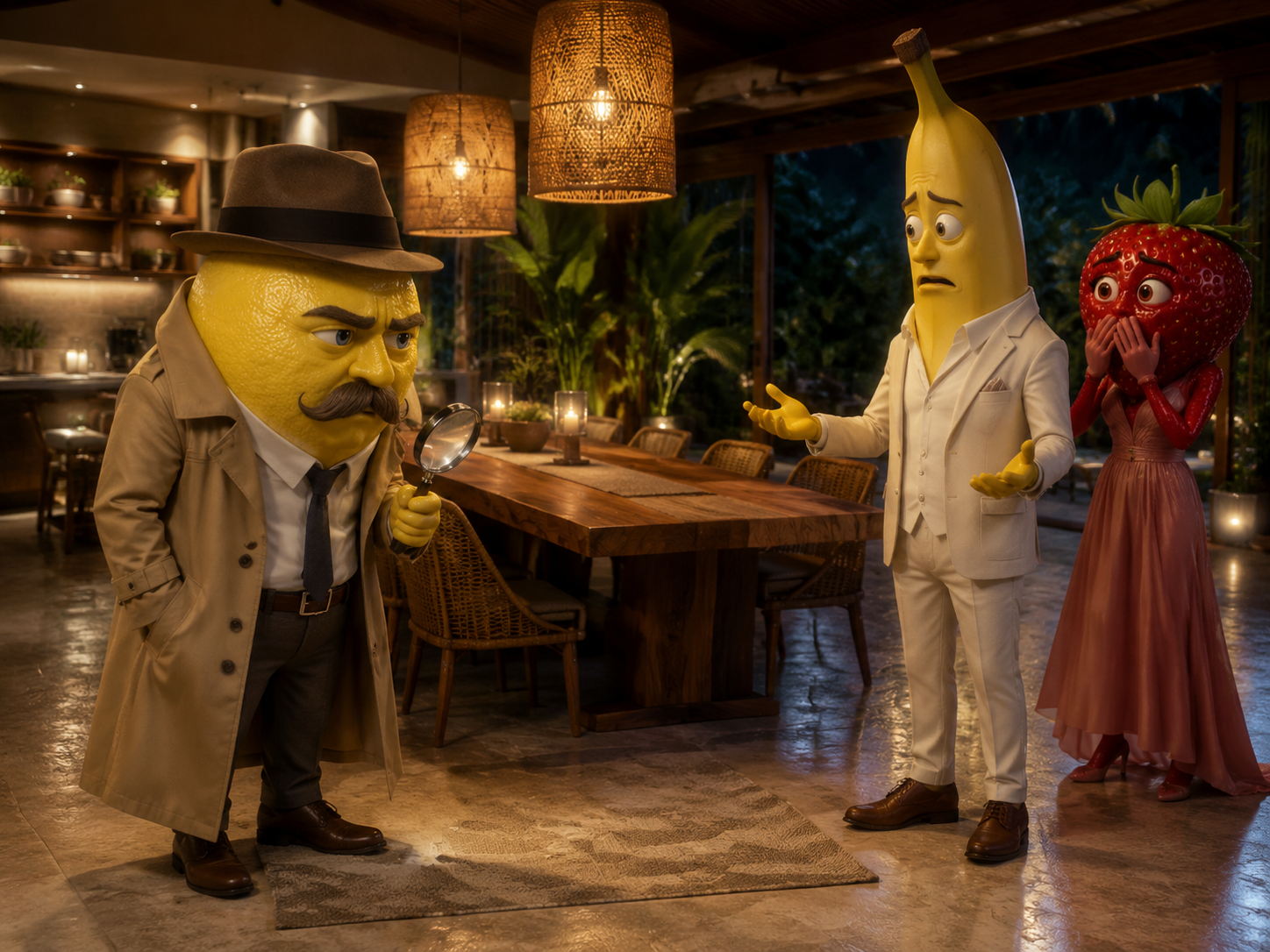
Use <<<image_1>>> as the opening frame and as the identity and dining-room layout reference. Preserve the exact appearances and clothing of the lemon, banana, and strawberry. Cinematic 3D anthropomorphic fruit mystery-comedy, 4:3, 12–15 seconds. Shot 1: From the opposite side of the table, track the lemon detective laterally in a medium shot as he paces back and forth. He supports his chin with one hand, suddenly stops, spins around, and points his right hand at the banana. With great seriousness, he announces: {The thief is… Banana!} Shot 2: Quickly cut to a close-up of the banana. He takes half a step backward, opens both hands, shakes his head, and urgently says: {I didn’t take anything!} The strawberry covers her mouth in shock behind him. Cut back to the lemon, who proudly adjusts his trench coat and begins removing his fedora with an exaggerated flourish. Shot 3: As the lemon removes his fedora, one diamond ring falls from inside the hat. It bounces twice on the wooden tabletop and comes to rest. All three characters look down at the ring at the same moment, then slowly look back at the lemon. The strawberry lowers her hand and asks in confusion: {Then why was it in your hat?} The lemon blinks awkwardly, quickly puts the hat back on, and pretends to investigate something else. End on the speechless expressions of the banana and strawberry. Show exactly one ring. It must obey gravity and land on the table. Each line must be spoken only by the correct character while the others keep their mouths closed. <soft footsteps> <ring clinking on wood twice> <awkward silence>. No music, no subtitles, no on-screen text, no narration, no character merging, and no extra limbs.
AIフルーツストーリー動画生成ツール
プロンプトを入力するかキャラクター画像をアップロードするだけで、動き・セリフ・音声のあるフルーツミーム動画をAIが生成します。
参考画像(キーフレームを含む)を合計最大9枚まで追加できます。各ファイルは30MB未満。
MP4/MOV, each 2-15s, max 3 clips, combined <=15s.
MP3/WAV/AAC/M4A/OGG, max 3 clips, combined <=15s.
話題になるAIフルーツミーム動画を作成
ひとつのアイデアから、登場人物、動き、セリフ、音声を含む短編動画を作れます。
テキストから生成
物語を入力すると、AIが登場人物、舞台、動き、カメラを作ります。
実例からスタート
完成済みの例を読み込み、登場人物や物語だけを変更できます。
複数キャラクターをアニメ化
会話、ジェスチャー、表情、小道具の動きを1シーンにまとめます。
作品をまとめて保存
完成動画を作品ページで確認し、次のエピソードに活用できます。
参照画像でキャラクターをコントロール
開始フレームやキャラクター画像を使い、登場人物の見た目を保ちます。
既存の画像を動画に
デザイン済みのフルーツや完成シーンをそのまま動かせます。
変身前後を指定
衣装、別キャラクター、変身後の姿を追加画像で指定できます。
画像と文章を組み合わせる
画像で見た目を、文章で動き、セリフ、カメラを決めます。
物語に合うモデルと出力を選択
モデル、長さ、解像度、画面比率、音声を選んで生成できます。
複数のAI動画モデル
Seedance、Kling、PixVerse、Veoを1つの生成画面で使えます。
長さと解像度を調整
モデルに応じて4〜15秒、最大720pの動画を生成できます。
セリフとシーン音声
音声対応モデルなら、セリフと環境音も同時に生成できます。
このAIフルーツストーリー動画生成ツールを選ぶ理由
ひとつのAI制作フローで、フルーツストーリーの生成、調整、書き出しまで行えます。
透かしなしでダウンロード
投稿や共有に使えるクリーンな完成動画を保存できます。
複数のAI動画モデル
動き、速度、画質に合わせて対応モデルを選べます。
最大4K出力
対応するワークフローでは最大4Kの高解像度で出力できます。
動画・画像編集ツール
同じプラットフォームで画像の調整や動画編集を続けられます。
AIフルーツストーリー動画の作り方
3つの簡単な手順でフルーツストーリーを作成できます。
- 1
物語を入力、または例を選択
アイデアを書くか、用意されたストーリープロンプトを読み込みます。
- 2
画像と出力設定を追加
キャラクター画像を追加し、モデルと出力設定を選びます。
- 3
生成して動画を確認
必要クレジットを確認し、生成後に作品ページで結果を見られます。
AIフルーツストーリー動画の作例
この生成ツールで作成した5本の4:3フルーツストーリーをご覧ください。
ほかのAI動画生成ツール
AIブレインロット動画生成ツール
突拍子もないアイデア、最初のフレーム、キャラクターの参照画像を、短くカオスなAIミーム動画に変換します。作例を読み込み、画像や場面を自分のアイデアに合わせて変更できます。
「Hotel Lobby」風デュオ動画AIジェネレーター
友だち、ペット、キャラクターの写真を2枚アップロードするだけ。この無料のHotel Lobby AIラップデュオ動画ジェネレーターが、あのオレンジ色のスタジオでQuavoとTakeoffのようにラップを掛け合う動画に仕上げます。
A2O LITE NEON Dance AI 動画ジェネレーター
写真2枚でネオンダンス。左の黒髪ロングのダンサーと右のライトブラウンのダンサーを入れ替え、振付とカメラワークはそのまま残します。
AIググガガ動画生成
ググガガ・ペンギンの画像一枚を、すぐ共有できる短い動画に。参考画像と既成の物語プロンプトを選び、対応する動き、音声、画面比率で生成できます。
Dame Hombro AI 動画ジェネレーター
写真1枚で Dame Hombro の主役に。鮮明な写真をアップロードすると、AI が赤いライトのパーティー動画にその人を入れ替え、動き・観客・カメラ・元の音声を保ちます。
Dime Dime Baby AI動画ジェネレーター
写真1枚でバズる結婚式ダンス。Dime Dime Babyの振付をあなたのキャラクターに、ゲスト・カメラ・照明はそのまま。
KONG KONG KING KING KING AIデュオ動画生成
写真2枚と1台のキーボードで、あなたのデュオを。白いスタジオの左の演奏者と右の盛り上げ役を、選んだ2人に入れ替えます。
Sawadika Dance AI 動画ジェネレーター
写真1枚でバズダンス。屋上のダンサーを入れ替え、Sawadikaの振付、ローアングルのカメラ、青空の背景はそのまま。
STORM II AI動画ジェネレーター
STORM II AI動画ジェネレーターで、あなたのキャラを主役に。1枚をセンターに、もう1枚を階段いっぱいに。独自の深度参考動画はダンスの動きだけを伝えるので、顔も衣装もすべてあなたの画像から作られます。
ロゼ&ブルーノ・マーズ「APT.」AI動画ジェネレーター
ロゼ&ブルーノ・マーズ「APT.」AI動画ジェネレーターに写真を2枚入れるだけ。写真1がマイク、写真2がドラムを担当し、15秒のピンクスタジオ動画になります。
AIフルーツストーリー動画生成 FAQ
テキストと任意の参照画像から、擬人化したフルーツが登場する短編アニメを作るAI動画ツールです。選んだモデルにより、動き、セリフ、カメラワーク、音声も生成できます。
テキストプロンプト、ページ内の例、開始フレーム、追加の参照画像を利用できます。
Seedance、Kling、PixVerse、Veoなどに対応しています。利用可能なモデルと設定は生成画面の最新表示をご確認ください。
現在は4〜15秒、480pまたは720pを選べます。組み合わせはモデルによって異なります。
モデル、長さ、解像度、設定によって変わります。生成ボタンに開始前の見積もりが表示されます。
音声生成に対応するモデルなら可能です。プロンプトにセリフと音を入力し、利用可能な音声設定を有効にしてください。
処理が終わると作品ページに保存され、後から確認できます。
いいえ。Promptsrefは同番組やブランドと提携しておらず、承認も受けていません。オリジナル作品を作り、保護されたロゴやコピーしたキャラクターは使用しないでください。