


Complete Guide to Writing Effective Midjourney Prompts
What is a Midjourney Prompt?
In Midjourney, a prompt is a text command you provide to instruct the AI what to create. It can be a single word, a sentence, or a detailed description combining various elements to guide the output. Prompts are the blueprint of the AI creative process. The more thoughtfully your prompt is designed, the more likely the result will match your expectations.
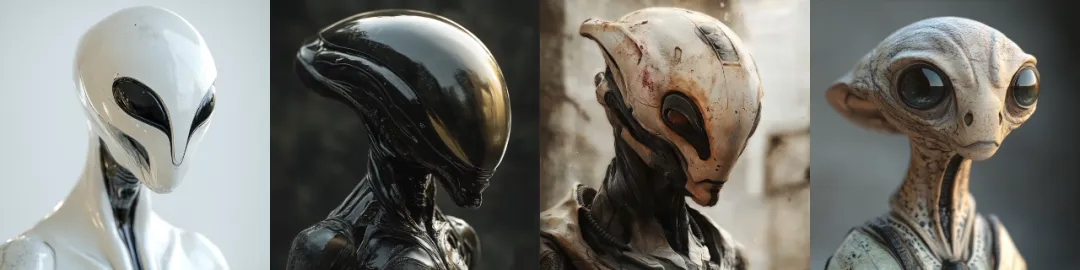
Simple prompt: An alien humanoid --v 6.1
.webp)
More detailed prompt: A low-angle shot of an alien humanoid creature with a glowing screen on its face, looking down from the side, atmospheric lighting, and a minimalist background --v 6.1
Basic Components of a Prompt
Each prompt can be broken down into key components to guide the AI more effectively:
- Subject: What you want the image to depict, such as characters, objects, scenes, or concepts. For example, "a man", "a rock", "a desert", or "a cyberpunk city".
- Background or Scene: Where the subject is located or its spatial relationship. For example, "a rock flying over mountains" or "a cyberpunk city at sunset".
- Style: You can specify artistic styles like watercolor or oil painting, or modern styles like cyberpunk. This adds a creative layer and guides how the AI should render the image.
- Mood or Atmosphere: Describe the emotional tone or feeling you want the image to convey. Words like "mysterious", "bright", "surreal", or "peaceful" help Midjourney set the tone.
- Technical Parameters: Use parameter commands to control style direction [--sref], character state [--cref], dimensions [--ar], and other image details.
A low-angle shot of an alien humanoid creature with a glowing screen on its face, looking down from the side, atmospheric lighting, and a minimalist background --v 6.1
.webp)
A low-angle shot of an alien humanoid creature with a glowing screen on its face, looking down from the side, atmospheric lighting, and a minimalist background --sref 2946597935 --sw 88 --s 666 --niji 6
Use parameter commands to control style direction [--sref], character state [--cref], dimensions [--ar], and other image details.
How to Optimize Prompts
Midjourney interprets prompts in a semi-abstract way. Rather than understanding descriptions word for word, it processes the overall concept and tries to make the final image match your intent. Specificity is key. Start with a simple prompt or parameter adjustment, then iterate based on the generated result.
1. Initial prompt: Prompt: A banana is floating in the air --v 6.1
.webp)
Review the generated result: If it looks good but lacks a specific artistic style, you can iterate and optimize further.
2. Optimized prompt: Prompt: Banana shaped hologram of molten liquid metal, floating in air, isolated on a lilac background, minimalist design, vector illustration, high resolution photography --v 6.1
.webp)
3. Add adjustment parameters: Prompt: Banana shaped hologram of molten liquid metal, floating in air, isolated on a lilac background, minimalist design, vector illustration, high resolution photography --sref 1982393082 --sw 116 --s 321 --v 6.1
.webp)
Looks like there's a problem. We used the wrong style code, so let's change it.
4. Change the style code: If the result is closer to your expectations, you can continue refining the prompt.
.webp)
--sref 4262062604 / --sref 3423758849 / --sref 4115477301 / --sref 1855803089
Finally, by changing the style code and gradually optimizing the prompt, parameter commands, and values, we achieved the desired result. This process helps you generate more accurate and visually impressive images.