Nano Banana 2 Prompt - Leitfaden für industrielle Röntgen-Produktvisualisierung

- Modell
- Nano Banana 2
Prompt
{
"visual_style_analysis_v2": {
"style_definition": {
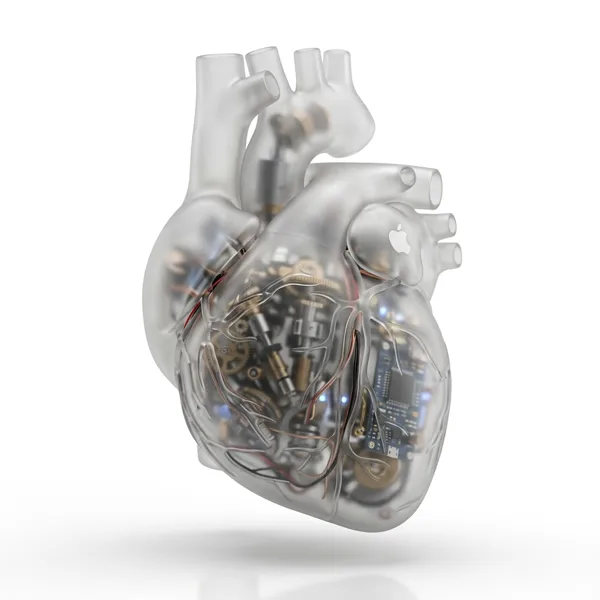
"name": "Industrial X-Ray Transparency Render",
"core_aesthetic": [
"Minimalist",
"Futuristic",
"Clinical Precision",
"Structural Functionalism"
],
"visual_logic": "Exploded view aesthetics within a closed shell"
},
"color_system": {
"palette_type": "Monochromatic Grayscale with Metallic Accents",
"background": "#F5F5F5 to #FFFFFF (Clean Studio White)",
"foreground": {
"outer_shell": "Frosted Translucent White/Grey",
"inner_components_primary": "Matte Black/Dark Graphite",
"inner_components_secondary": "Metallic Silver/Copper",
"highlights": "Soft Specular Highlights"
}
},
"internal_component_architecture": {
"description": "Hierarchy of internal parts to create realistic density",
"layer_1_structure_skeleton": {
"elements": "Injection molding ribs, screw bosses, mounting brackets",
"visual_role": "Defines the shape and adds 'ghostly' lines inside the shell"
},
"layer_2_power_drive": {
"elements": "Cylindrical/Pouch Batteries, Copper Coils, Transformers, Magnets",
"visual_role": "Provides visual weight and dense black masses"
},
"layer_3_logic_control": {
"elements": "Printed Circuit Boards (PCB), Solder points, Silicon Chips, Ribbon Cables",
"visual_role": "Adds intricate, fine detail and technical texture"
},
"layer_4_interface": {
"elements": "Tactile switches, USB-C ports, LED indicators, haptic motors",
"visual_role": "Connects the inside to the outside surface"
}
},
"lighting_and_atmosphere": {
"lighting_type": "Backlit Clinical Studio",
"characteristics": [
"Transmissive Glow",
"Rim Lighting to define edges",
"Soft Ambient Occlusion inside"
]
},
"materials_and_textures": {
"shell_material": "Frosted Polycarbonate (PC) with 85% opacity",
"internal_finish": "Matte vs Glossy contrast (components are glossy, shell is matte)",
"x_ray_effect": "Depth-based opacity (thicker parts look darker)"
},
"demonstration_example": {
"product_type": "Pro Game Controller / Precision Tool",
"prompt_application": "Show rumble motors (weights), battery pack in center, ribbon cables connecting triggers, complex PCB under buttons"
},
"ai_prompt_keywords_suggestion": [
"X-ray render",
"translucent frosted shell",
"visible internal engineering",
"layered internal components",
"complex circuitry",
"copper coils and batteries",
"structural ribbing",
"C4D octane render",
"industrial exploded view",
"schematic realism"
]
}
}
Remixe
RemixNoch keine Remixe. Erstelle die erste Version.
Diesen Bild-Prompt verwenden
- 01
Mit dem Prompt starten
Kopiere den Prompt oder öffne ihn über die Schaltfläche zum Generieren.
- 02
Eigene Änderungen vornehmen
Passe Motiv, Umgebung oder Details an. Füge bei Bedarf Referenzen hinzu.
- 03
Vor dem Generieren prüfen
Prüfe Modell und Ausgabeeinstellungen. Die Ergebnisse können variieren.