 Promptsref
AI Special effects
A detailed "AI Special effects" AI workflow, including complete prompts and steps.
Complete AI workflow steps
Step 1: Generate an image from a prompt
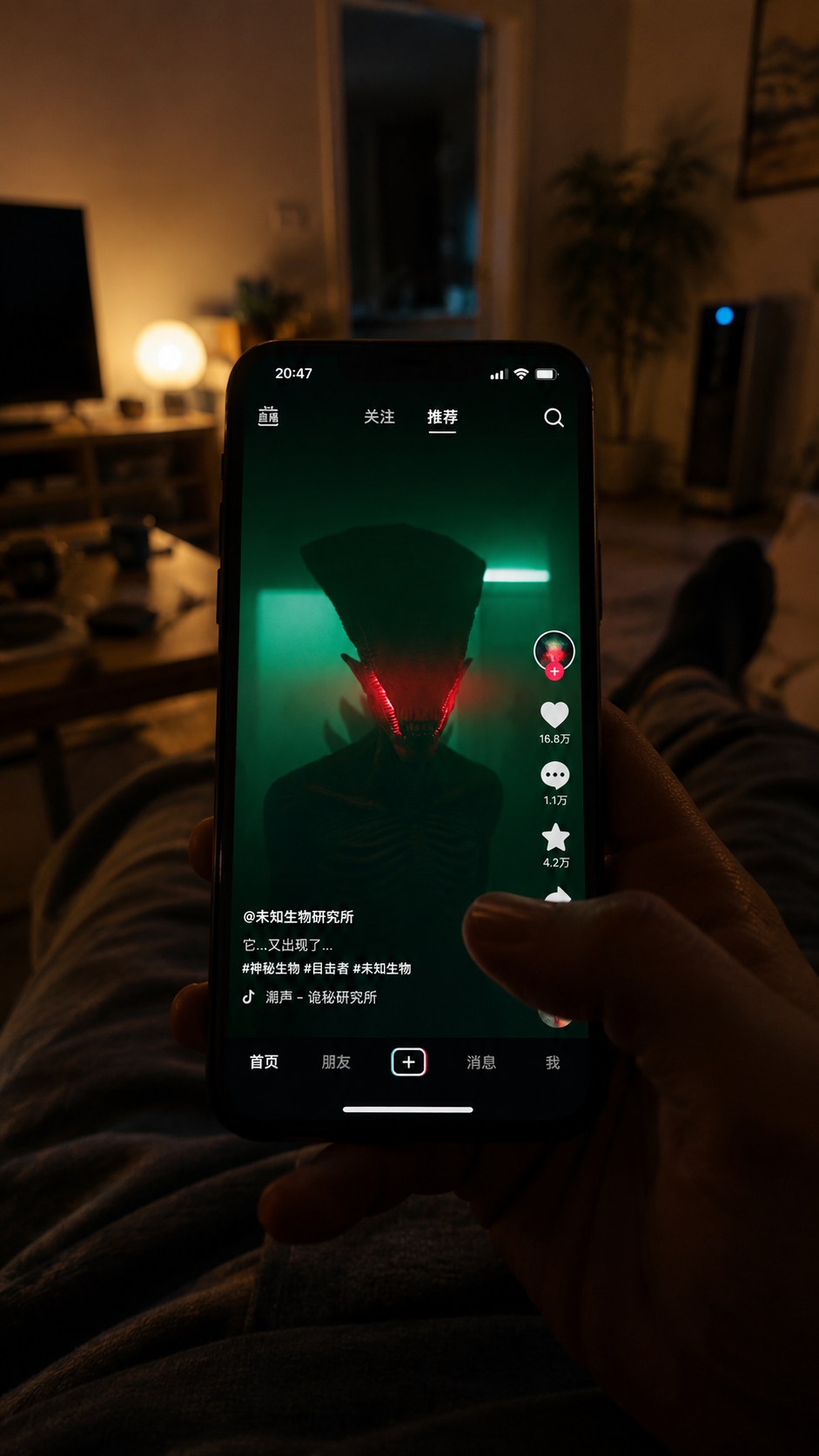
A first-person perspective: a person in the living room holding a phone in one h
Prompt: A first-person perspective: a person in the living room holding a phone in one hand, scrolling through Douyin (TikTok). The Douyin interface is shown in the reference image.,
Image output: https://aitool.promptsref.com/generated/images/2026/06/12/269753.png
Step 2: Generate a video from reference images
Video generation
Prompt: Use the provided image as the first frame. A 5-second vertical first-person cinematic horror video. A person is lying on a couch in a dim warm living room, holding a smartphone and watching a short-video clip of a dark alien-like monster under green fluorescent light. At 1 second, the thumb swipes upward, but the video does not change; the phone screen glitches, stretches, and flickers, the monster's red glowing eyes leaving smeared afterimages. At 2 seconds, the screen briefly cuts to black. In the next instant, the real living room has transformed into the same eerie green environment from the phone video: cold green fluorescent light, damp wall texture, dark hallway atmosphere, screen compression noise subtly in the air. The person is still holding the phone in their hand, but the phone screen is now black or frozen. The camera slowly tilts up from the phone toward the doorway. In the final second, the monster is no longer inside the phone; it stands silently in the doorway, staring directly at the viewer with the same red glowing eyes. No jump scare, no gore, quiet dread, handheld phone realism, shallow depth of field, smooth but tense camera movement, realistic lighting transition, vertical 9:16.
Video output: https://aitool.promptsref.com/generated/videos/2026/06/12/269757.mp4
Step 3: Generate a video from reference images
Video generation
Prompt: 0-1 秒: 保持首帧。第一人称躺在沙发上刷手机,昏暗温暖的客厅,手机屏幕里是绿色荧光灯下的怪物短视频。 1-2 秒: 拇指向上滑动,但画面没有切到下一条。再次尝试拇指向上滑动,但手机变成卡顿、拉伸、故障闪烁。怪物红色眼光在手机屏幕里拖出残影,像视频被强行拉住。现实世界环境的灯光突然变黑 2-3 秒: 下一瞬间,现实客厅已经变成绿色环境:冷绿色灯光、潮湿墙面、阴暗走廊质感。人物仍然躺在原来的位置,手里还拿着手机,手机屏幕变成黑屏或显示加载失败。 3-4 秒: 镜头缓慢从手机抬向门口。原本家里的门口变成了绿色短视频里的空间入口,周围有微弱屏幕噪点和压缩闪烁。 4-5 秒: 怪物站在门口,没有扑过来,只是静静看着他。红色眼睛亮起,和刚才手机里的怪物眼神完全一致。最后定格在怪物看向镜头的一瞬间。
Video output: https://aitool.promptsref.com/generated/videos/2026/06/12/269762.mp4
Step 4: Generate a video from reference images
Video generation
Prompt: Use the provided image as the first frame. A 5-second vertical first-person cinematic horror video. 0-1 seconds: Hold the first frame. First-person POV of someone lying on a couch, scrolling on a smartphone in a dim, warm living room. On the phone screen, a short-video clip shows a dark monster standing under green fluorescent light. 1-2 seconds: The thumb swipes upward, but the video does not switch to the next clip. The thumb tries to swipe upward again. This time the phone screen starts to freeze, stretch, glitch, and flicker. The monster's red glowing eyes smear into afterimages across the phone screen, as if the video is being forcibly held in place. At the same moment, the light in the real room suddenly goes dark. 2-3 seconds: In the next instant, the real living room has transformed into a green environment: cold green lighting, damp wall texture, and the feeling of a dark hallway. The person is still lying in the same position, still holding the phone, but the phone screen is now black or showing a loading failure. 3-4 seconds: The camera slowly tilts up from the phone toward the doorway. The original doorway of the home has become an entrance into the green short-video world, surrounded by subtle screen noise and compression flicker. 4-5 seconds: The monster stands in the doorway. It does not attack. It simply stands there, silently watching. Its red eyes light up, exactly matching the monster's eyes from the phone video. The shot freezes on the moment when the monster looks directly into the camera. Style: realistic handheld phone footage, first-person POV, vertical 9:16, cinematic horror, shallow depth of field, warm-to-green lighting transition, screen glitch artifacts, quiet dread, no jump scare, no gore, no readable brand logos, no extra text.
Video output: https://aitool.promptsref.com/generated/videos/2026/06/12/269768.mp4
Step 5: Generate a video from reference images
Video generation
Prompt: 0-1 seconds: Hold the first frame. First-person POV of someone lying on a couch, casually scrolling on a smartphone. The living room is dim and warm. On the phone screen, a short video is playing: a dark monster standing under green fluorescent light. 1-2 seconds: The thumb swipes upward, but the video does not switch to the next clip. The thumb pauses, then swipes upward again with more force. The phone screen begins to freeze, stretch, glitch, and flicker. The monster's red glowing eyes smear into afterimages across the screen. The hand holding the phone slowly tightens, the thumb pulls back slightly in confusion, and the breathing becomes heavier. At the same moment, the light in the real room suddenly goes dark. 2-3 seconds: In the next instant, the real living room has transformed into a green environment: cold green lighting, damp wall texture, and the oppressive feeling of a dark hallway. The person is still lying in the same position, still holding the phone. The phone screen is now black or showing a loading failure. The hand starts to tremble slightly, the phone dips for a moment, and the camera shakes subtly, as if the person has just realized the room has changed. 3-4 seconds: Do not zoom in. Do not push the camera forward. Only reveal the doorway through a natural, slight lift of the person's hand and line of sight. The movement should be small, hesitant, and frightened. The person's legs shift slightly on the couch, the hand grips the phone harder, and the breathing becomes tense. The original doorway of the home has become an entrance into the green short-video world, surrounded by subtle screen noise and compression flicker. 4-5 seconds: The monster stands in the doorway. It does not attack. It simply stands there, silently watching. The person freezes completely. The phone lowers slightly, revealing more of the doorway, but the camera still does not zoom in or push forward. The monster's red eyes light up, exactly matching the monster's eyes from the phone video. The shot holds on the monster looking directly into the camera. Style: realistic handheld phone footage, first-person POV, vertical 9:16, cinematic horror, shallow depth of field, natural human hesitation, slight trembling hand, tense breathing, warm-to-cold-green lighting transition, screen glitch artifacts, quiet dread, no zoom in, no camera push-in, no jump scare, no gore, no readable brand logos, no extra text.
Video output: https://aitool.promptsref.com/generated/videos/2026/06/12/269782.mp4
Step 6: Generate a video from reference images
Video generation
Prompt: 0-1 seconds: Hold the first frame. First-person POV of someone lying on a couch, casually scrolling on a smartphone. The living room is dim and warm. On the phone screen, a short video is playing: a dark monster standing under green fluorescent light. 1-2 seconds: The thumb swipes upward, but the video does not switch to the next clip. The thumb pauses, then swipes upward again with more force. The phone screen begins to freeze, stretch, glitch, and flicker. The monster's red glowing eyes smear into afterimages across the screen. The hand holding the phone slowly tightens, the thumb pulls back slightly in confusion, and the breathing becomes heavier. At the same moment, the light in the real room suddenly goes dark. 2-3 seconds: In the next instant, the real living room has transformed into a green environment: cold green lighting, damp wall texture, and the oppressive feeling of a dark hallway. The person is still lying in the same position, still holding the phone. The phone screen is now black or showing a loading failure. The hand starts to tremble slightly, the phone dips for a moment, and the camera shakes subtly, as if the person has just realized the room has changed. 3-4 seconds: Do not zoom in. Do not push the camera forward. Only reveal the doorway through a natural, slight lift of the person's hand and line of sight. The movement should be small, hesitant, and frightened. The person's legs shift slightly on the couch, the hand grips the phone harder, and the breathing becomes tense. The original doorway of the home has become an entrance into the green short-video world, surrounded by subtle screen noise and compression flicker. 4-5 seconds: The monster stands in the doorway. It does not attack. It simply stands there, silently watching. The person freezes completely. The phone lowers slightly, revealing more of the doorway, but the camera still does not zoom in or push forward. The monster's red eyes light up, exactly matching the monster's eyes from the phone video. The shot holds on the monster looking directly into the camera. Style: realistic handheld phone footage, first-person POV, vertical 9:16, cinematic horror, shallow depth of field, natural human hesitation, slight trembling hand, tense breathing, warm-to-cold-green lighting transition, screen glitch artifacts, quiet dread, no zoom in, no camera push-in, no jump scare, no gore, no readable brand logos, no extra text.
Video output: https://aitool.promptsref.com/generated/videos/2026/06/12/269788.mp4
Step 7: Generate a video from reference images
Video generation
Prompt: Use the provided image as the first frame. Create a 5-second vertical first-person cinematic short film. Hold the first frame. First-person POV of someone lying on a couch, scrolling on a smartphone. The living room is warmly lit, realistic, and natural. The thumb swipes upward, but the video does not switch to the next clip. The thumb pauses, then swipes upward again. The phone screen begins to slightly freeze, stretch, glitch, and flicker. Suddenly, a girl's voice comes from the real space hidden behind the phone: "Shh." The person's hand freezes, and their breathing pauses. As the phone moves down, the girl is revealed in the real world, kneeling on the floor in front of the couch, with the exact same pose, gesture, and expression as she had in the phone video. She does not rush forward. She does not make any exaggerated movement. She simply looks up quietly at the camera, still holding one finger in front of her lips in a "be quiet" gesture. The person freezes completely, the hand trembles slightly, and the phone lowers a little more. The girl's eyes are exactly the same as they were in the phone video. The shot holds on the moment when she looks directly into the camera. Style: realistic handheld phone footage, first-person POV, vertical 9:16, cinematic reality-fantasy, shallow depth of field, natural human hesitation, slight trembling hand, tense breathing, warm living room lighting, subtle screen glitch artifacts, quiet and uncanny but not horror, no zoom in, no camera push-in, no jump scare, no nudity, no sexualization, no readable brand logos, no extra text.
Video output: https://aitool.promptsref.com/generated/videos/2026/06/12/270070.mp4
Step 8: Generate an image from a prompt
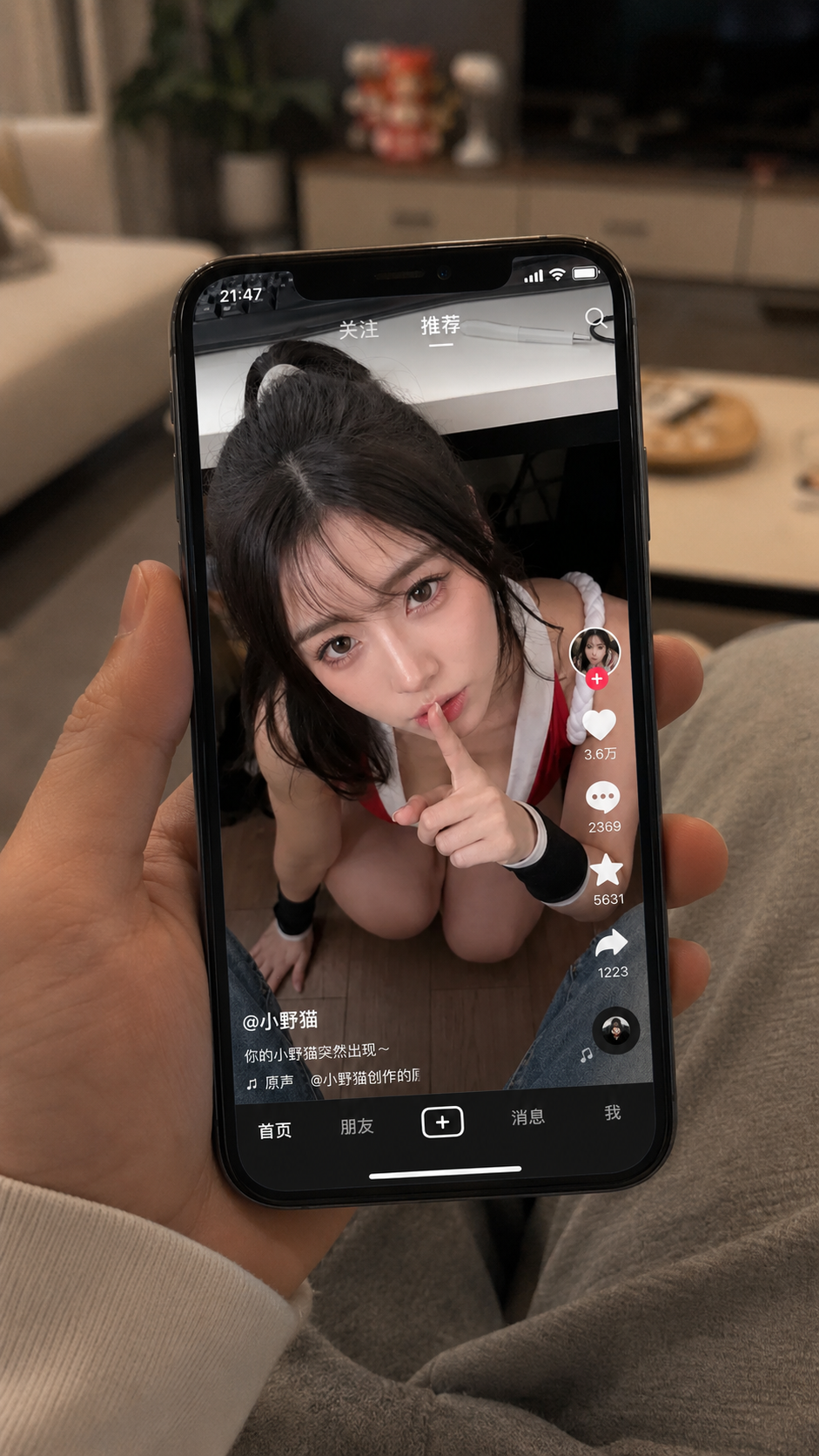
A first-person perspective: a person in the living room holding a phone in one h
Prompt: A first-person perspective: a person in the living room holding a phone in one hand, scrolling through Douyin (TikTok). The Douyin interface is shown in the reference image.,
Image output: https://aitool.promptsref.com/generated/images/2026/06/12/269987.png
Step 9: Generate a video from reference images
Video generation
Prompt: Use the provided image as the first frame. Create a 5-second vertical first-person cinematic short film. Hold the first frame. First-person POV of someone lying on a couch, scrolling on a smartphone. The living room is warmly lit, realistic, and natural. The thumb swipes upward, but the video does not switch to the next clip. The thumb pauses, then swipes upward again. The phone screen begins to slightly freeze, stretch, glitch, and flicker. Suddenly, a girl's voice comes from the real space hidden behind the phone: "Shh." The person's hand freezes, and their breathing pauses. As the phone moves down, the girl is revealed in the real world, kneeling on the floor in front of the couch, with the exact same pose, gesture, and expression as she had in the phone video. She does not rush forward. She does not make any exaggerated movement. She simply looks up quietly at the camera, still holding one finger in front of her lips in a "be quiet" gesture. The person freezes completely, the hand trembles slightly, and the phone lowers a little more. The girl's eyes are exactly the same as they were in the phone video. The shot holds on the moment when she looks directly into the camera. Style: realistic handheld phone footage, first-person POV, vertical 9:16, cinematic reality-fantasy, shallow depth of field, natural human hesitation, slight trembling hand, tense breathing, warm living room lighting, subtle screen glitch artifacts, quiet and uncanny but not horror, no zoom in, no camera push-in, no jump scare, no nudity, no sexualization, no readable brand logos, no extra text.
Video output: https://aitool.promptsref.com/generated/videos/2026/06/12/270092.mp4
Step 10: Generate a video from reference images
Video generation
Prompt: Use the provided image as the first frame. Create a 5-second vertical first-person cinematic short film. Hold the first frame. First-person POV of someone lying on a couch, scrolling on a smartphone. The living room is warmly lit, realistic, and natural. The person's thumb swipes upward, trying to switch to the next video. At the exact moment the thumb slides upward, the girl inside the phone screen suddenly reacts. Her right hand reaches out from inside the screen, passing through the glass-like surface, and grabs the viewer's thumb, stopping the swipe. Around the point of contact, the screen shows subtle glitches, slight stretching, flickering, and compression noise. The girl slowly begins to emerge from the phone screen into the real living room. First her hand and wrist, then her face and upper body gradually appear outside the phone. Her expression remains quiet and calm. She does not rush forward or make any exaggerated movement. She keeps looking directly at the viewer, maintaining the same quiet and uncanny intimacy from the phone video. In the final second, she is half inside the phone screen and half in the real world, close to the couch, still gently holding the viewer's thumb to stop them from swiping away. The shot holds on the moment when she looks directly into the camera. Style: realistic handheld phone footage, first-person POV, vertical 9:16, cinematic reality-fantasy, shallow depth of field, natural human hesitation, slight trembling hand, tense breathing, warm living room lighting, subtle screen glitch artifacts around the contact point, quiet uncanny intimacy, no zoom in, no camera push-in, no jump scare, no nudity, no sexualization, no readable brand logos, no extra text.
Video output: https://aitool.promptsref.com/generated/videos/2026/06/12/270181.mp4
Step 11: Generate a video using reference images
Video generation
Prompt: Use the provided image as the first frame. Create a 5-second vertical first-person cinematic short film. Hold the first frame. First-person POV of someone lying on a couch, scrolling on a smartphone. The living room is warmly lit, realistic, and natural. The real living room behind the phone must remain empty, with no girl or duplicate person appearing in the background. The person's thumb swipes upward, trying to switch to the next video. At the exact moment the thumb slides upward, the girl inside the phone screen suddenly reacts. Her right hand reaches out from inside the phone screen itself, passing through the glass-like screen surface, and grabs the viewer's thumb, stopping the swipe. The phone screen is the only portal. Around the contact point, the screen shows subtle glitches, slight stretching, flickering, and compression noise. The girl must emerge only from the phone display plane, not from behind the phone and not from the room background. First her right hand and wrist come through the screen, physically crossing over the phone bezel. Then part of her face and upper body begin to protrude from the phone screen, still connected to the image inside the display. Her body remains aligned with the phone video perspective. Do not place her full body on the real floor or behind the phone. Her expression remains quiet and calm. She does not rush forward or make any exaggerated movement. She keeps looking directly at the viewer, maintaining the same quiet and uncanny intimacy from the phone video. In the final second, she is partially crossing through the phone screen, still half inside the phone video and half outside the glass surface, close to the phone, still gently holding the viewer's thumb to stop them from swiping away. The real background behind the phone remains the original empty living room. The shot holds on the moment when she looks directly into the camera. no zoom in, no camera push-in, no jump scare, no nudity, no sexualization, no readable brand logos, no extra text. Negative constraints: no duplicate girl, no girl appearing in the background, no girl standing behind the phone, no girl kneeling on the real floor, no separate real-world copy of the girl, do not change the living room background into her scene, only one girl, she must come out through the phone screen surface only.
Video output: https://aitool.promptsref.com/generated/videos/2026/06/12/270184.mp4
Step 12: Generate a video from reference images
Video generation
Prompt: 以提供的图片作为首帧,生成一段 5 秒竖屏第一人称电影感短片。 保持首帧。第一人称视角,人物躺在沙发上刷手机。客厅灯光温暖,画面真实自然。手机后方的真实客厅必须保持空置,不要让女生或重复人物出现在背景里。 人物拇指做一个正常刷短视频的快速上滑动作:动作要像平时切换下一条视频一样,快速、自然、随手一划。这个上滑动作不能慢,不能小心翼翼,也不能像刻意表演。就在拇指快速上滑、视频即将切到下一条的一瞬间,手机屏幕里的女生突然有了反应。她的右手从手机屏幕内部伸出,像穿过玻璃屏幕一样,在拇指上滑途中抓住观看者的拇指,突然阻止他继续划走。手机屏幕是唯一的入口。接触点周围出现轻微屏幕故障,画面有细微拉伸、闪烁和压缩噪点。 在被女生抓住之后,拇指才停止移动。手部轻微发抖,但手机整体位置基本保持不变。女生必须只从手机显示屏平面里穿出来,不能从手机后方出来,也不能从真实客厅背景里出现。 先是她的右手和手腕穿过屏幕,越过手机边框。然后她的一部分脸和上半身开始从手机屏幕里探出,但仍然和屏幕里的画面连接在一起。她的身体方向必须和手机视频里的透视保持一致。不要让她完整站到现实地板上,也不要让她出现在手机后面的客厅里。 她的表情保持安静、平静。她没有突然扑近,也没有夸张动作。她一直直视观看者,保持手机视频里那种安静而诡异的亲密感。 最后一秒,她正在部分穿过手机屏幕,一半还在手机视频里,一半已经穿出玻璃屏幕表面,靠近手机,仍然轻轻抓着观看者的拇指,阻止他划走。手机后方的真实背景仍然是原本空置的客厅。镜头停在她直视镜头的一瞬间。 风格: 真实手持手机拍摄感,第一人称 POV,竖屏 9:16,电影感现实幻想,浅景深,自然的人类迟疑反应,手部轻微发抖,紧张呼吸,温暖客厅灯光,接触点周围有轻微屏幕故障痕迹,安静诡异的亲密感,不要 zoom in,不要推镜,不要跳吓,不要裸露,不要色情化,不出现真实品牌 logo,不出现多余文字。最开始的上滑动作必须快速自然,像真实刷短视频一样。只有在女生抓住拇指之后,动作才突然停止。不要把上滑动作做慢,不要小心翼翼,不要戏剧化慢动作。 负面约束: 不要重复女生,不要让女生出现在背景里,不要让女生站在手机后面,不要让女生跪在现实地板上,不要出现另一个现实世界里的女生副本,不要把真实客厅背景变成她的视频场景,只能有一个女生,她必须只从手机屏幕表面穿出来。
Video output: https://aitool.promptsref.com/generated/videos/2026/06/12/270188.mp4
Step 13: Upload a reference video
grok-video-aa53153c-d4ab-4520-8519-319cce223d7a.mp4
Uploaded asset: grok-video-aa53153c-d4ab-4520-8519-319cce223d7a.mp4. File type: video/mp4.