Seedance 2.0 Fast Prompt - Adieux de Pastèque et Fraise sur le quai en pleine tempête

- Modèle
- Seedance 2.0 Fast
- Format
- 4:3
- Qualité
- 720p
Prompt
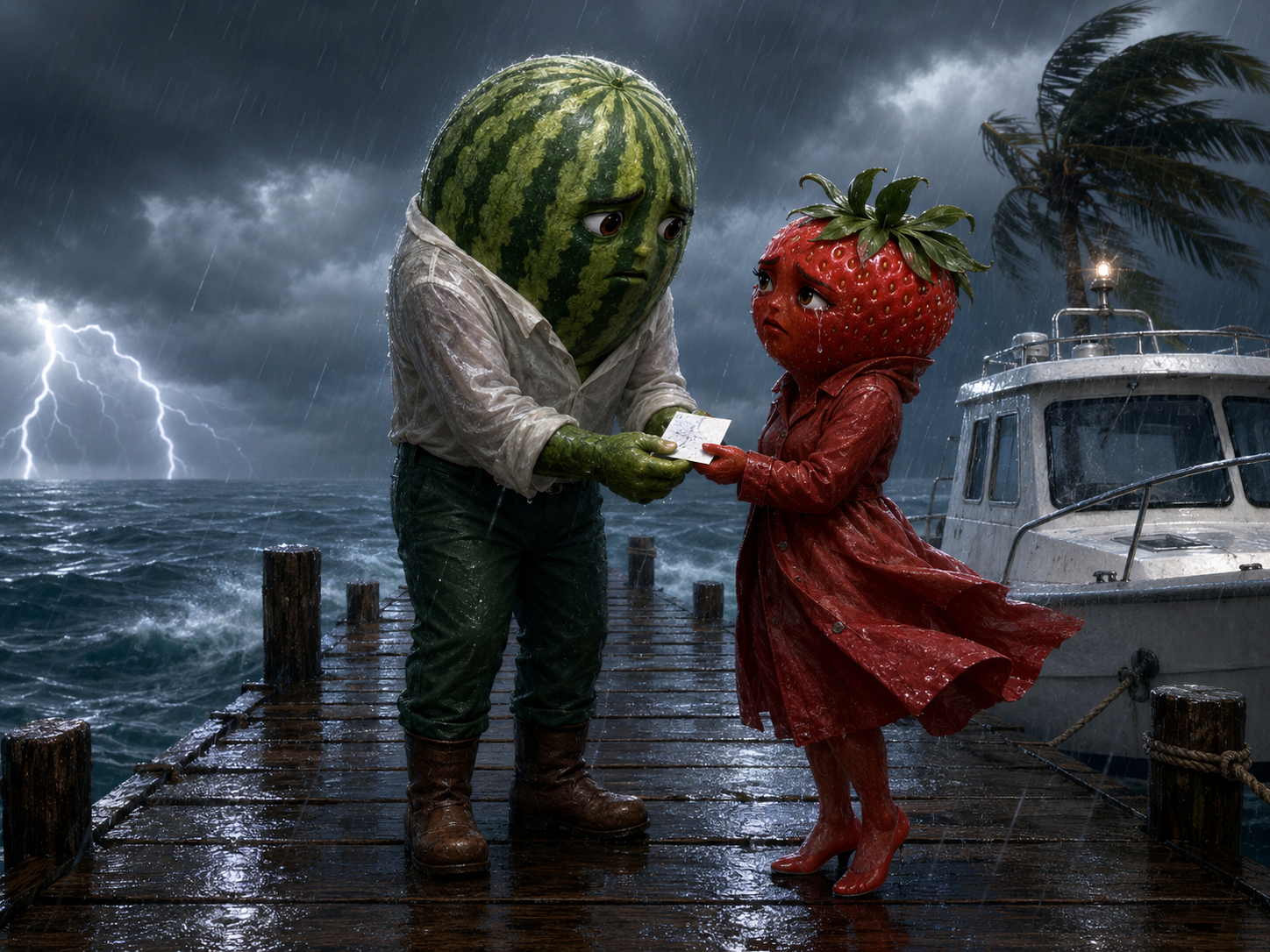
Use <<<image_1>>> as the opening frame and as the identity reference for the stormy dock, the watermelon, and the strawberry. Preserve the fruit shapes, clothing, and positions of both characters. Cinematic 3D anthropomorphic fruit romantic drama, 4:3, 12–15 seconds.
Shot 1: Begin with a close-up of the boat ticket between their hands, then slowly tilt upward to their faces. The watermelon firmly presses the ticket into the strawberry’s palm. She shakes her head, grips his arm tightly, and tearfully cries: {I’m not leaving without you!} Strong wind moves her leafy crown and red coat.
Shot 2: Cut to a medium close-up of the watermelon. With a gentle but determined expression, he releases the strawberry’s hand and carefully pushes her toward the rescue boat on the right. He says: {Then survive for both of us.} The strawberry steps backward onto the boat while continuing to reach for him. No crew members are visible; the boat slowly pulls away from the dock on its own.
Shot 3: Briefly track with the departing rescue boat, then orbit behind the watermelon as he stands alone on the dock. The strawberry continues reaching toward him from the boat but says nothing more. A powerful flash of lightning illuminates the distant ocean on the left, revealing a second dark mysterious boat and a motionless silhouette at its bow shaped strangely like the watermelon. The watermelon raises his head slightly. End as he notices the mysterious boat.
Maintain consistent rain direction, boat movement, and spatial continuity. Match the dialogue precisely to the correct speaker’s lip movements and keep the emotions restrained and believable. <heavy rain and wind> <wooden dock creaking> <distant thunder> <boat engine fading away>. No music, no subtitles, no on-screen text, no narration, no visible crew members, no character merging, and no extra limbs.
Image de référence
Remix
RemixPas encore de remix. Créez la première version.
Utiliser ce prompt vidéo
- 01
Commencer avec le prompt
Copiez le prompt ou ouvrez-le avec le bouton de génération.
- 02
Apporter vos modifications
Adaptez le sujet, le décor ou les détails. Ajoutez des références si nécessaire.
- 03
Vérifier avant de générer
Vérifiez le modèle et les paramètres de sortie. Les résultats peuvent varier.